Updated November 6, 2026
Datavio taxes are small for most people, but they’re easy to miss, because Datavio won’t send you a tax form. Yes, Datavio pay is taxable. Datavio pays per approved task through PayPal, with nothing withheld and no W-2, so your pay is self-employment income, and reporting it is up to you.
I haven’t worked on Datavio, but it’s a lot like Neevo, where I earned $110 doing AI data tasks paid through PayPal, and I’ve filed taxes on that and on AI training work from Outlier and Handshake AI. Everything in this guide comes from Datavio’s job posts, IRS rules and my Datavio tax calculator, so you can check each piece yourself.
Datavio taxes, the short answer:
- Is Datavio pay taxable? Yes. Every approved task you’re paid for counts as income.
- Does Datavio take out taxes? No. Nothing is withheld, and there’s no W-2.
- Does Datavio send a 1099? Don’t expect one. Datavio pays through PayPal, and PayPal only sends a 1099-K above $20,000 and 200 payments a year.
- Do you owe self-employment tax? Once your gig profit is about $433 or more. At $25 a task, that’s 18 approved tasks.
- Do you owe income tax? If you have a job, yes, from the first dollar. Otherwise, only once your total income passes your standard deduction.
Table of Contents
Do You Have to Pay Taxes on Datavio?
Yes. Datavio taxes kick in once you’re past either of two lines. Datavio pays you for work, with no paycheck withholding and no W-2, so for US taxes you’re treated like a contractor. That means two different taxes can apply, and you can owe one, both or neither:
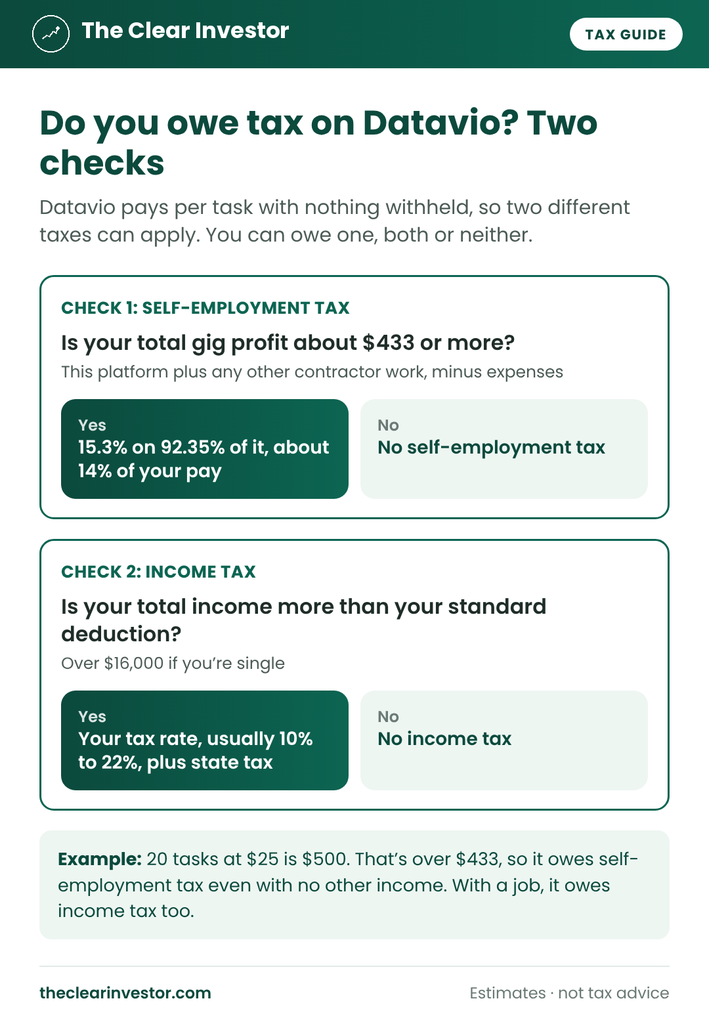
- Self-employment tax starts when your net earnings from self-employment are $400 or more. Net earnings are 92.35% of your profit, so that’s about $433 of profit. It’s 15.3% for Social Security and Medicare, and it applies even if you owe no income tax.
- Income tax only applies to income above your standard deduction, which is over $16,000 for single filers, over $32,000 for married couples filing jointly and over $24,000 for heads of household. It goes up with inflation each year.
So if Datavio is your only income and you earn less than about $433 in a year, you owe nothing. Past $433, you owe self-employment tax. And if you have a job, your Datavio pay gets income tax at your bracket from the first dollar, since your job already uses up the standard deduction.
What Is Datavio, and How Does It Pay?
Datavio collects training data for AI. Its job posts describe it as part of the iSoftStone group, a large IT services company based in Beijing, and its tasks range from recording short videos and audio to testing apps and evaluating AI. Which tasks you can do depends on your language and sometimes your phone.
The posts I found paid per approved task, by PayPal, after a quality review. One mobile video task paid $25 per video, for 30 seconds to 2 minutes of footage. There’s no hourly rate. You’re paid for what passes review.
When I checked, Datavio’s site was down for a system upgrade, and I couldn’t find a published tax FAQ or terms. So the tax side comes from IRS rules, which don’t depend on how a platform words things:
- No W-2 and no withholding means the pay is self-employment income, reported on Schedule C.
- Pay per approved task means only approved tasks are income. Rejected work isn’t paid, so there’s nothing to report.
- PayPal decides which tax form you could get, if any.
Is Datavio Pay Self-Employment Income or Other Income?
On my site, I cover two kinds of side money, and they’re taxed differently:
- Rewards from apps like Qmee or Amazon Shopper Panel are other income. They go on Schedule 1 and never get self-employment tax.
- Pay for work, like Outlier, Neevo or Prolific, is self-employment income. It goes on Schedule C and gets self-employment tax past $433.
Datavio is pay for work. You record, test or evaluate something to a spec, it gets reviewed, and you’re paid for it. So Datavio taxes follow the Schedule C rules, the same as my Neevo pay did. The upside is that you can deduct expenses, which reward apps don’t allow.
Does Datavio Send a 1099?
Don’t expect one. Datavio pays through PayPal, and the IRS says payments made through a payment network like PayPal go on the network’s Form 1099-K, not on a 1099-NEC from the company. So any form would come from PayPal:
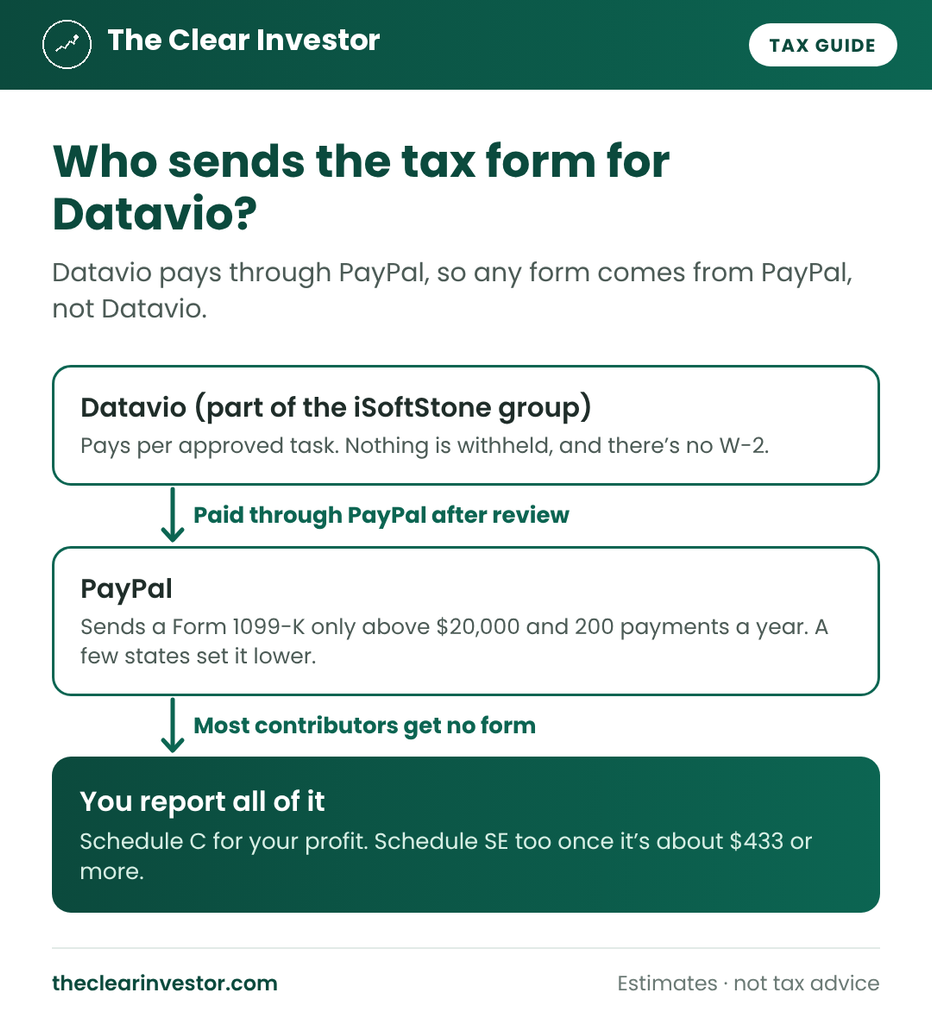
PayPal sends a Form 1099-K when you get more than $20,000 in more than 200 payments in a year. At $25 a task, that’s 800 approved tasks, so almost no one gets there from Datavio. A few states set the bar lower, like Maryland, Massachusetts, Vermont, Virginia and Illinois.
A 1099-K counts every business payment to your PayPal, not only Datavio. If it includes money that isn’t income, the IRS says to contact the issuer for a corrected form.
No form doesn’t mean no tax. The IRS says gig income has to be reported even if you don’t get a 1099-K, 1099-MISC or W-2.
When Does Datavio Pay Count as Income?
For Datavio taxes, pay counts in the year it lands in your PayPal. Datavio pays after a quality review, so there’s a gap between doing a task and getting paid for it.
That gap is how my Neevo income ended up in two tax years. Both of my Neevo projects ran in December, but the second payment arrived in January, so it counted for the next year. The same thing can happen with Datavio:
- A task you did in December and got paid for in January counts for the new year.
- A task still waiting on review isn’t income yet.
- Money sitting in your PayPal balance counts, whether or not you move it to your bank.
The simplest way to stay consistent: add up the Datavio payments in your PayPal activity from January through December.
Datavio vs. Neevo: Similar Work, Taxed the Same Way
If you’ve done Neevo, Datavio taxes will feel familiar. Here’s how the two compare:
| Datavio | Neevo (my experience) | |
|---|---|---|
| Who runs it | Part of the iSoftStone group | Defined.ai |
| Kind of work | Videos, audio, app tests, AI evaluation | Short AI data tasks and recordings |
| How you’re paid | Per approved task, through PayPal | $1 a task, up to $50 a project, through PayPal |
| Tax form | PayPal’s 1099-K, only at high volume | PayPal’s 1099-K, only at high volume |
| How it’s taxed | Self-employment income | Self-employment income |
Both go on Schedule C, and the $433 line counts them together. My $110 from Neevo was under it, but Neevo and Datavio together could push you over. Here’s how Neevo AI taxes work.
How Much Tax Will You Owe on Datavio?
Self-employment tax is the part of Datavio taxes that catches people, because it applies even with no other income. Here’s how it builds:

Here’s the full picture for a single filer in Texas, which has no state income tax:
| Datavio earnings | No other income | With a $40,000 W-2 job |
|---|---|---|
| $300 | $0 | $29 |
| $500 | $71 | $115 |
| $1,000 | $141 | $231 |
| $2,500 | $353 | $576 |
| $5,000 | $706 | $1,153 |
Under $433 with no other income, you owe nothing. Past $433, about 14%. With a $40,000 job, your Datavio pay lands in the 12% bracket, so you owe about 10% under $433 and about 23% once self-employment tax kicks in too.
So how much to set aside:
| Your situation | Set aside about |
|---|---|
| Under $433 of gig profit, no other income | 0% |
| Under $433, with a job in the 12% bracket | 10% |
| Over $433, no other income | 14% |
| Over $433, with a job in the 12% bracket | 23% |
On a $25 task, that’s $3.50 with no other income, or about $5.75 with a job in the 12% bracket. Add your state’s rate if it has an income tax. The Datavio tax calculator gives you one number for your situation.
Do You Need to Pay Datavio Taxes Quarterly?
Probably not. The IRS expects estimated tax payments only when you’ll owe $1,000 or more when you file. With no other income, that takes about $7,100 of gig profit, which is about 284 tasks at $25.
With a job, you’d reach $1,000 sooner, since your Datavio pay gets income tax too. If you get close, the easier fix is having a bit more withheld from your paycheck: on Form W-4, Step 4(c) lets you add a flat extra amount per paycheck. Here’s how quarterly payments and the W-4 option work.
Free tax tracker + deadline reminders
Get my free side income tax tracker
Sign up and I’ll send you my Google Sheets tracker that shows how much of each payout to set aside. You’ll also get an email before each quarterly tax deadline (Jan 15, Apr 15, Jun 15 and Sep 15), plus my new guides. Unsubscribe anytime.
Earn on several platforms or drive for work? Get the full 1099 Side Income Tracker ($12) →
Deductions That Lower Your Datavio Taxes
Because Datavio pay is self-employment income, business expenses come off your profit before either tax is figured. For data tasks, the useful ones are:
- The business share of your phone and data plan, if you record videos or audio on it.
- The business share of your internet.
- Equipment a task requires, like a microphone, in proportion to how much you use it for the work.
Only the business share counts, so write down how you worked it out. For a few small tasks a year, it’s rarely worth the effort. Once you’re past $433, every $100 of expenses saves about $14 of self-employment tax, plus income tax if you have a job.
The qualified business income deduction also comes off automatically. It takes up to 20% of your profit off your taxable income. Here are more deductions that lower side hustle taxes.
Datavio Taxes: How to Report Your Earnings
- Find your total. Search your PayPal activity for Datavio payments from January through December.
- Report it on Schedule C, with expenses in Part II, and figure self-employment tax on Schedule SE once your gig profit is about $433 or more. Here’s how reporting side hustle income works, step by step.
I file with TaxAct. You enter your Datavio total as self-employment income, with no 1099 needed, and it fills in Schedule C and, if needed, Schedule SE. If you also do Neevo, Outlier or other AI data work, it all goes on the same Schedule C.
Do you even have to file? If your net self-employment earnings are under $400 and your total income is under your standard deduction, you generally don’t have to file a federal return. If you file anyway, for a job or a refund, include your Datavio pay.
Special Situations
A few situations change your Datavio taxes.
If you only did one or two tasks
You still report them if you file a return. But a couple of $25 tasks are well under the $433 line, so there’s no self-employment tax on them either way. With a job, they just add a few dollars of income tax.
If you do other AI data or training work
Your Datavio pay and other contractor pay go on one Schedule C, and the $433 line counts all of it together. Here’s how Outlier AI taxes work and how DataAnnotation taxes work.
If someone claims you as a dependent
If you’re a student your parents claim, your standard deduction is smaller and based mostly on your earned income. Once your net self-employment earnings are $400 or more, you have to file your own return. IRS Publication 501 covers the dependent rules.
If you live outside the US
Datavio hires in many countries and languages. This guide and my calculator cover US taxes only. Outside the US, your country’s rules apply.
Common Datavio Tax Mistakes
These are the mistakes I’d watch for with Datavio taxes:
- Thinking small amounts don’t count. All of it is income. The form limits are about forms, not tax.
- Waiting for a 1099. It won’t come. Use your PayPal activity.
- Counting tasks by the day you did them. Count payments by the day they reached PayPal.
- Counting rejected tasks. If a task didn’t pass review, it wasn’t paid, so it isn’t income.
- Forgetting the $433 line counts all gig income. Datavio plus Neevo or Outlier can push you over.
- Not keeping records. Save your PayPal history each year. The IRS says to keep records for 3 years after you file in most cases.
My Verdict: Do You Owe Taxes on Datavio?
Your Datavio pay is taxable, but for most people, the tax is small. With no other income and under about $433 of gig profit, you owe nothing. With a job, set aside about 10%, or about 23% once you pass $433. Datavio won’t send a 1099, so add up your PayPal payments and report them on Schedule C.
The rules every side hustle shares, like deductions, quarterly payments and when you have to file, are in my side hustle taxes guide.
Also doing data tasks on Neevo? Read my honest Neevo AI review. Doing AI training work too? See my Outlier AI review and every platform I’ve used: How I make money online.
FAQ
Is Datavio pay taxable?
Yes. Every approved task you’re paid for counts as income.
Does Datavio take out taxes?
No. Nothing is withheld, and there’s no W-2.
Does Datavio send a 1099?
Don’t expect one. Datavio pays through PayPal, and PayPal only sends a 1099-K above $20,000 and 200 payments in most states.
Do I owe self-employment tax on Datavio?
Only once your total gig profit is about $433 or more in a year. At $25 a task, that’s 18 approved tasks.
When does Datavio pay count as income?
In the year it lands in your PayPal, not the year you did the task.
Where do I find my Datavio earnings for taxes?
In your PayPal activity. Add up the Datavio payments from January through December.
Where do I report Datavio income?
On Schedule C as self-employment income, with Schedule SE once your gig profit is about $433 or more.
Do rejected Datavio tasks count as income?
No. If a task didn’t pass review, it wasn’t paid, so there’s nothing to report.
I’m not a licensed financial advisor or tax professional. I haven’t worked on Datavio, so this guide is based on Datavio’s job posts, IRS rules and my experience with similar data and AI training work. It’s for educational purposes and isn’t tax advice. Tax rules change, so check the IRS links above or talk to a tax professional about your situation. I’m not affiliated with Datavio, iSoftStone or PayPal.