
Want to know how much you really make per hour on Prolific? Upload your Prolific submission history, and this Prolific hourly rate calculator shows your real hourly rate, your hourly rate by year, and how many studies you’ve had approved, returned or rejected.
I built this using my own Prolific data. Across 512 paid studies, I make about $13 an hour. Here’s how much I’ve made on Prolific.
Prolific Hourly Rate Calculator
Upload your Prolific submission history and see what you really make per hour.
Your Prolific CSV
Your hourly rate by year
| Year | Paid studies | Time in studies | Per hour |
|---|
Your submissions by status
| Status | Count |
|---|
How this is calculated
- Per hour = what you were paid ÷ the time between starting and finishing each study.
- Paid studies are approved studies plus screen-outs. For approved studies, the reward and bonus are counted. For screen-outs, only the amount you were actually paid is counted.
- Studies over 4 hours are left out. These are usually multi-part studies or a tab left open, and they’d make your hourly rate look much lower than it really is.
- Pounds are converted to dollars at the exchange rate above.
- Time spent waiting for studies isn’t in the CSV, so your real hourly rate is a little lower.
Why no total earnings? Some researchers pay bonuses later, and those don’t always show up in the CSV. So a total from the file can be a little lower than your Prolific dashboard. Your hourly rate is still accurate.
How to Download Your Prolific CSV
Step 1: Go to the Submissions tab in Prolific.
Step 2: Click the small arrow next to Submission History.
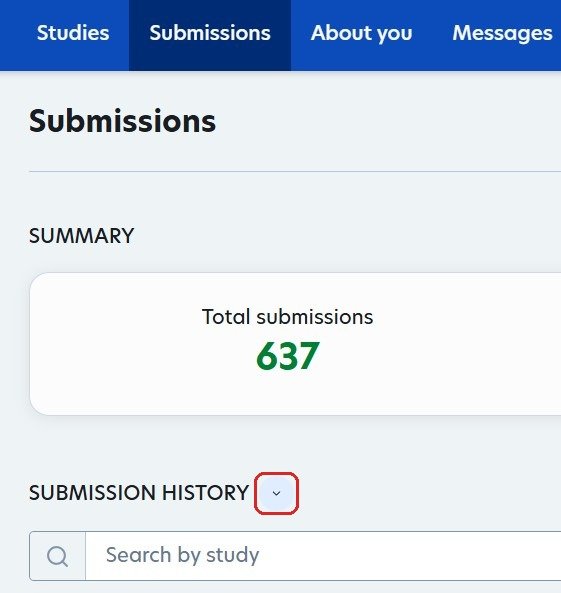
Step 3: Click Download submissions. Prolific saves a CSV file of every study you’ve taken.
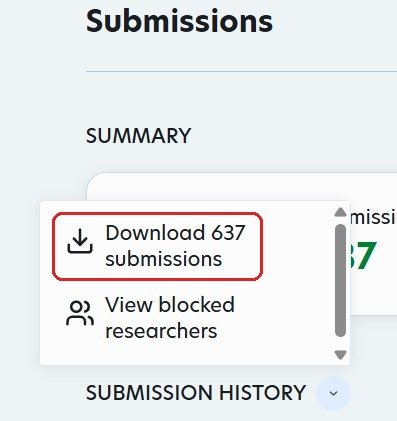
Step 4: Upload that file to the calculator above.
You need a computer for this. The download option is on the Prolific website.
How to Use the Prolific Hourly Rate Calculator
- Upload your CSV. Drop the file in, or tap to choose it.
- Set the exchange rate. Many Prolific studies pay in pounds, so update the rate to today’s (search “GBP to USD” on Google).
- Read your results. You’ll see your hourly rate, time spent in studies, your typical study length and your hourly rate by year.
Why It Shows Your Hourly Rate, Not Your Total
Some researchers pay bonuses days later, and those don’t always show up in the CSV. So a total from the file can come out a little lower than your Prolific dashboard. Your hourly rate is still accurate, and it’s the more useful number anyway: it tells you whether your time on Prolific is worth it.
Prolific requires researchers to pay at least $8 an hour and recommends $12. If you’re under $12, here are 10 tips to get more studies on Prolific.
Prolific Hourly Rate Calculator FAQ
Is it safe to upload my Prolific CSV?
Yes. The file is read in your browser and never uploaded to any server. Nothing is saved.
How much does Prolific pay per hour?
Prolific requires at least $8 an hour and recommends $12. I average about $13 an hour across 512 paid studies.
Why are some studies left out?
Studies over 4 hours are left out. They’re usually multi-part studies or a tab left open, and they’d make your hourly rate look much lower than it is.
Does it count screen-outs?
Yes. Screen-outs count as paid studies, using only the amount you were actually paid.
Does it include time waiting for studies?
No. The CSV only has the time inside each study, so your real hourly rate is a little lower.
This calculator gives estimates for informational purposes only. It isn’t affiliated with Prolific.