
This Twitch tax calculator shows how much tax you’ll owe on your Twitch subs, ads, Bits and tips in 2026, after your streaming gear and other costs, and how much to set aside from each payout. It also tells you which tax forms to expect from Twitch. Want to know how Twitch money is taxed first? Read my Twitch tax guide.
Most Twitch tax calculators treat every dollar the same. This one doesn’t: your Bits and outside tips get the federal tips deduction and your subs don’t, your gaming PC counts only for the share you stream with, and a room you use only for streaming comes off too.
Twitch Tax Calculator
See how much tax you’ll owe on your Twitch subs, Bits, ads and tips in 2026, after your streaming gear and other costs, and how much to set aside from each payout.
What Twitch paid you in 2026
Money from outside Twitch
Your streaming costs
Your other income
Tax you’ve already paid
About you
Your tax forms
| Form | From | Amount |
|---|
Your total 2026 tax: before vs. after deductions
| Before deductions | After deductions |
|---|
How your taxable income is worked out
How this is calculated
- Streaming income = everything Twitch paid you (subs, ads, Bits and other payouts) + tips and donations from outside Twitch + sponsorships + what gifted products you kept would cost to buy. Twitch pays each month’s earnings the next month, so enter what was paid in 2026.
- Streaming profit = your income minus your streaming costs. It’s self-employment income, reported on Schedule C.
- Gear = what you paid × the share you use for streaming. “All of it in 2026” deducts it in full, which the de minimis safe harbor (items up to $2,500) or 100% bonus depreciation (gear bought after Jan. 19, 2025) usually allows. “Spread it out” uses the first year of 5-year depreciation: 20%.
- Streaming room uses the IRS simplified home office method: $5 a square foot, up to 300 square feet ($1,500). It can’t be more than your streaming income minus your other streaming costs.
- Self-employment tax is 15.3% (12.4% Social Security and 2.9% Medicare) on 92.35% of your self-employment profit. You only owe it when that comes to $400 or more, which means about $433 of profit. Social Security tax stops at $184,500 of combined W-2 pay and self-employment earnings, and an extra 0.9% Medicare tax applies above $200,000 ($250,000 married filing jointly, $125,000 separately). Half of the 15.3% is deductible.
- Federal income tax uses the 2026 brackets and standard deduction ($16,100 single or married filing separately, $32,200 married filing jointly, $24,150 head of household). Married filing separately uses the single brackets, except that the 37% rate starts at $384,350. It also includes the qualified business income deduction: 20% of your self-employment profit after the self-employment tax deduction, and at least $400 when that’s $1,000 or more.
- Tips deduction: Bits and tips from outside Twitch can count as qualified tips, since the IRS lists digital content creators as a tipped occupation. Subs, ads, sponsorships and gifted products don’t. The deduction is up to $25,000, no more than your streaming profit, and shrinks by $100 for every $1,000 of income over $150,000 ($300,000 married filing jointly). Married couples only get it on a joint return. It lowers federal income tax only, not self-employment tax. It runs from 2025 through 2028.
- Child tax credit is $2,200 per child under 17. Up to $1,700 per child can come back as a refund, based on 15% of your earned income over $2,500.
- State income tax uses 2026 rates, brackets, standard deductions and exemptions from the Tax Foundation, updated for the 2026 cuts in Arkansas, Georgia, South Carolina, Utah and West Virginia. A few states (like California) hadn’t published 2026 bracket amounts, so their 2025 amounts are used. Head of household and married filing separately use single brackets. The tips deduction is left out of state tax, since each state decides whether to follow it.
- Tax on your Twitch income = your total tax minus what your total tax would be without streaming. The set-aside percentage is that tax divided by your streaming income, not counting gifted products.
- Tax forms: Twitch reports royalties (subs and ads) on Form 1099-MISC once they reach $10, and service income (Bits and some other payouts) on Form 1099-NEC once it reaches $2,000 (the line was $600 through 2025). Payment apps send a Form 1099-K once you get more than $20,000 in more than 200 payments. Sponsors send a 1099-NEC at $2,000 or more. You report all of it either way.
- Before deductions leaves out your streaming costs, the standard deduction, the qualified business income deduction, the tips deduction, and state deductions and exemptions, so you can see how much they save you.
Not included: the actual-expense home office method, later years of gear depreciation, the earned income tax credit, city and county income taxes (like New York City or Maryland counties), state low-income credits, itemized deductions, retirement or health insurance deductions, and tax withheld from a W-2 job. Your real tax can be lower.
Free tax tracker + deadline reminders
Get my free side income tax tracker
Sign up and I’ll send you my Google Sheets tracker that shows how much of each payout to set aside. You’ll also get an email before each quarterly tax deadline (Jan 15, Apr 15, Jun 15 and Sep 15), plus my new guides. Unsubscribe anytime.
Earn on several platforms or drive for work? Get the full 1099 Side Income Tracker ($12) →
Table of Contents
How to Use the Twitch Tax Calculator
Fill in the boxes from top to bottom. Every box is in dollars except the gear share and the streaming room.
What Twitch paid you
- Subscriptions. Paid, Prime and gift subs, from your payout history.
- Ads. Your ad revenue.
- Bits. What Twitch paid you for Cheers.
- Other Twitch payouts. Bounties and anything else Twitch paid you.
Use what was paid in 2026. Twitch pays each month’s earnings the next month, so December’s earnings count next year.
Money from outside Twitch
- Tips and donations through PayPal, Streamlabs, StreamElements or Ko-fi.
- Sponsorships and brand deals paid to you directly.
- Gifted products you kept, at what they’d cost to buy.
Your streaming costs
- Gear you bought in 2026 and how much of it is for streaming. If you game on your PC off stream about a fifth of the time, enter 80%.
- How to deduct your gear. All of it this year, or spread out, which deducts 20% now.
- Software, music and art, internet and phone, and other streaming costs.
- Streaming room. The square feet of a space you use only for streaming. Enter 0 if you also use it for anything else.
Your other income, tax already paid and about you
- Other self-employment profit and W-2 income, if you have them.
- Tax withheld by Twitch and estimated payments you’ve already made.
- Filing status, children and your state.
Who This Calculator Is For
The Twitch tax calculator is built for US streamers who earn from Twitch, as an Affiliate or a Partner. It’s most useful if you:
- Just got your first payouts and want to know what to set aside.
- Earn a lot from Bits or tips, since they get a tax break that subs don’t.
- Bought a new streaming PC or setup this year and want to see what it saves.
- Stream from a dedicated room.
- Stream on the side of a full-time job.
If you also post on YouTube, my YouTube tax calculator handles AdSense, memberships and Super Chats.
How to Read Your Results
The Twitch tax calculator shows your results in five parts.
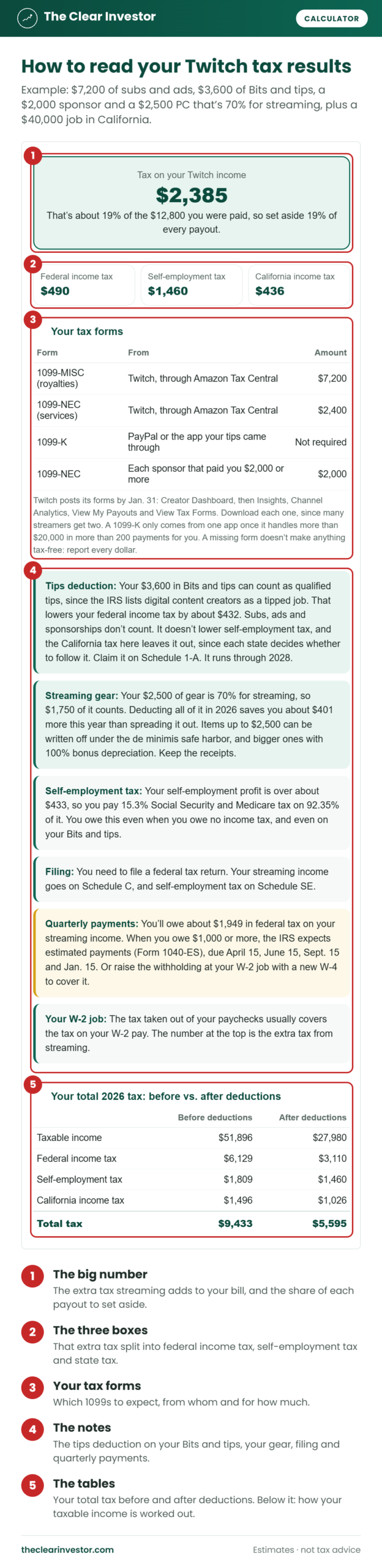
- The big number is the extra tax your streaming adds to your 2026 bill, with the share of every payout to set aside.
- The three boxes split it into federal income tax, self-employment tax and state income tax.
- Your tax forms list which 1099s to expect, from whom and for how much, or “Not required” when you’re under the line.
- The notes cover the tips deduction on your Bits and tips, your gear, your streaming room, filing and quarterly payments.
- The tables compare your total tax before and after deductions, and show how your taxable income is worked out.
Worked Example 1: $5,000 From Twitch, No Other Income, in Texas
This is the calculator’s starting example: a single streamer in Texas with $3,000 of subs, $600 of ads, $900 of Bits and $500 in tips through Streamlabs. They bought an $1,800 PC that’s 80% for streaming and spent $240 on software and art and $300 on internet and phone.
| Step | Amount |
|---|---|
| Subs, ads, Bits and tips | $5,000 |
| Gear ($1,800 × 80%) | −$1,440 |
| Software, art, internet and phone | −$540 |
| Streaming profit | $3,020 |
| Federal income tax | $0 |
| Self-employment tax | $427 |
| Tax on their Twitch income | $427 |
That’s about 9% of what they were paid, all of it self-employment tax. The standard deduction covers the income tax, so the tips deduction on their $1,400 in Bits and tips doesn’t save anything this year. They’ll get a 1099-MISC for their $3,600 of subs and ads, but no 1099-NEC, since their $900 of Bits is under $2,000.
Worked Example 2: Subs, Bits, Tips and a Sponsor + a $40,000 Job in California
A single streamer in California with a $40,000 job earns $6,000 of subs, $1,200 of ads, $2,400 of Bits, $1,200 in tips and a $2,000 sponsorship. They bought a $2,500 PC that’s 70% for streaming and spent $360 on software and $360 on internet and phone.
| Step | Amount |
|---|---|
| Subs and ads | $7,200 |
| Bits and tips | $3,600 |
| Sponsorship | $2,000 |
| Gear ($2,500 × 70%) | −$1,750 |
| Software, internet and phone | −$720 |
| Streaming profit | $10,330 |
| Federal income tax | $490 |
| Self-employment tax | $1,460 |
| California income tax | $436 |
| Tax on their Twitch income | $2,385 |
That’s about 19% of the $12,800 they were paid. The tips deduction takes all $3,600 of Bits and tips off their federal taxable income, which saves about $432. They’ll get a 1099-MISC for $7,200, a 1099-NEC for $2,400 from Twitch and a 1099-NEC from the sponsor. At about $1,949 of federal tax on their streaming, they’re over the $1,000 line for quarterly payments, or a W-4 change at the job.
Worked Example 3: Deduct Your Gear Now or Spread It Out?
The same streamer as Example 2, with the gear spread out instead. Spreading deducts 20% of the $1,750 now, and the rest in later years:
| All of it in 2026 | Spread out | |
|---|---|---|
| Gear deducted in 2026 | $1,750 | $350 |
| Streaming profit | $10,330 | $11,730 |
| Self-employment tax | $1,460 | $1,657 |
| Federal and California income tax | $926 | $1,129 |
| Tax on their Twitch income | $2,385 | $2,786 |
Deducting it all now saves about $401 this year. Spreading it only makes sense if you expect to earn a lot more in the next few years, since each deduction is worth more in a higher bracket.
Worked Example 4: A Streaming Room
The streamer from Example 1, with a $40,000 job, adds a 120-square-foot spare room they use only for streaming:
| No streaming room | 120-square-foot room | |
|---|---|---|
| Streaming room deduction | $0 | $600 |
| Streaming profit | $3,020 | $2,420 |
| Federal income tax | $101 | $48 |
| Self-employment tax | $427 | $342 |
| Tax on their Twitch income | $528 | $390 |
The $600 deduction saves about $138. The room has to be used regularly and only for streaming, so a bedroom with a streaming desk in it doesn’t count.
More Example Results
Here’s what $10,000 of Twitch income costs in tax with a $40,000 job, by state. Each row assumes a quarter of it is Bits, the rest is subs and ads, and $1,500 goes to streaming costs:
| State | Tax on $10,000 of Twitch income | Set aside |
|---|---|---|
| Texas or Florida | $1,659 | 17% |
| Pennsylvania | $1,920 | 20% |
| North Carolina | $1,975 | 20% |
| California | $1,993 | 20% |
| Illinois | $2,050 | 21% |
| Georgia | $2,054 | 21% |
| New York | $2,086 | 21% |
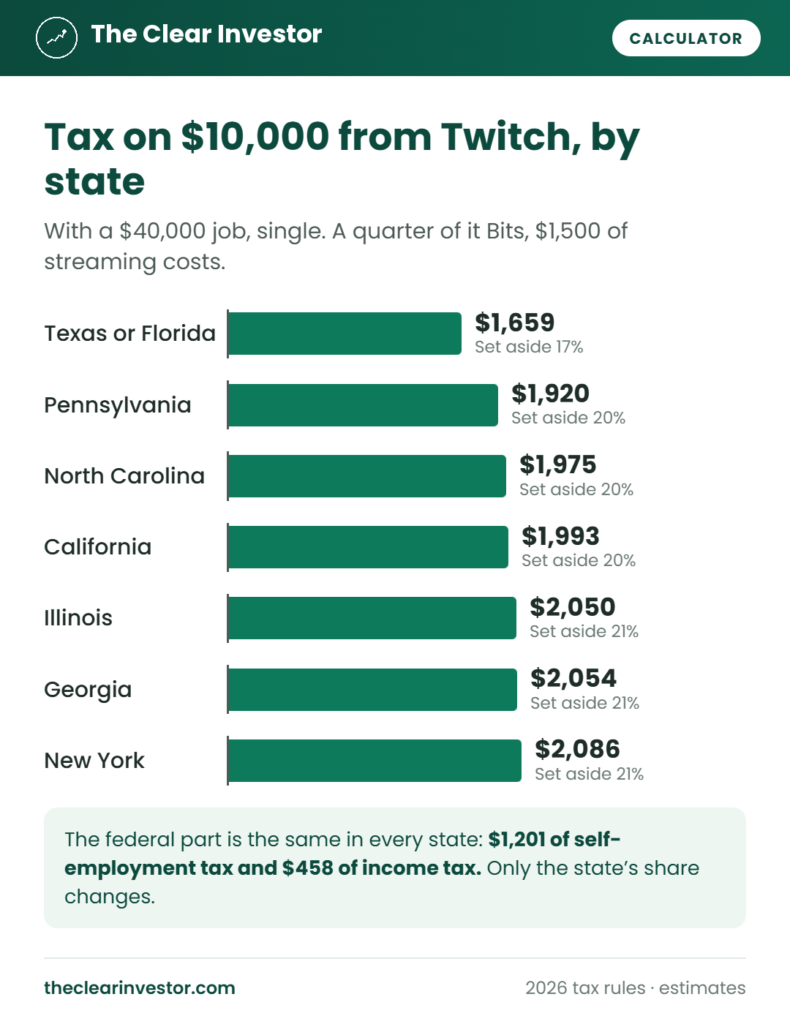
The federal part is the same everywhere: $458 of income tax and $1,201 of self-employment tax. Only the state’s share changes.
How the Twitch Tax Calculator Works
The Twitch tax calculator works out your whole 2026 tax with and without your streaming, and shows you the difference.
Streaming income. Everything Twitch paid you, plus tips from outside Twitch, sponsorships and what your gifted products would cost to buy.
Streaming costs. Your gear times the share you use for streaming, either all of it or 20% in the first year if you spread it out, plus your software, art, internet, phone and other costs. The streaming room is $5 a square foot, up to 300 square feet, and no more than your income after your other costs.
Self-employment tax. 15.3% of 92.35% of your profit, once that’s $400 or more. Social Security stops at $184,500 of combined W-2 pay and self-employment earnings.
Income tax. The 2026 brackets and standard deduction, after half of the self-employment tax and the qualified business income deduction. Your Bits and outside tips come off as qualified tips, up to $25,000 and no more than your streaming profit.
State tax. Your state’s 2026 rates, brackets and deductions, without the tips deduction, since each state decides whether to follow it.
Tax forms. A 1099-MISC once subs and ads reach $10, a 1099-NEC once Bits and other Twitch payouts reach $2,000, a 1099-K once outside tips pass $20,000 in more than 200 payments, and a sponsor’s 1099-NEC at $2,000.
What the Calculator Leaves Out
It doesn’t count the later years of gear you spread out, the actual-expense home office method, the earned income tax credit, city taxes, itemized deductions, or retirement and health insurance deductions, which can all lower your real tax. It assumes you stream as a business, not a hobby. And it can’t tell whether a payment was Bits or a sub, so check your payout history before you enter them.
Tips for Accurate Results
To get the most out of the Twitch tax calculator:
- Use your payout history, not the revenue chart, so your numbers match what Twitch paid you in 2026.
- Split Bits from subs. The tips deduction only applies to Bits and tips.
- Be honest about the gear share. If you game off stream half the time, enter 50%.
- Keep every receipt for gear, software and art.
- Only count a room you use for nothing else.
- Run it again before each quarterly deadline, as your payouts add up.
What to Do With Your Result
- Move your set-aside percentage from every payout into a separate savings account.
- Download both Twitch forms in January and check them against your payout history.
- Pay quarterly if you’ll owe $1,000 or more, or raise your W-4 at your job.
- Read the Twitch tax guide for how each kind of income is reported.
Twitch Tax Calculator FAQ
What should I enter as my Twitch income?
What Twitch paid you in 2026, from your payout history, split into subs, ads, Bits and other payouts. December’s earnings usually pay out in January, so they count next year.
Why are Bits and subs in separate boxes?
Bits can count as tips for the federal tips deduction, and subs can’t. Twitch also reports them on different forms: subs on a 1099-MISC and Bits on a 1099-NEC.
Should I include tips from PayPal or Streamlabs?
Yes. They’re income, and they can count as tips too.
What if I also use my PC for gaming?
Enter the share you use for streaming. Only that share is deductible.
Should I deduct my gear all at once or spread it out?
Most streamers save more by deducting it all in the year they buy it. Spreading it out only helps if you expect to be in a higher bracket later.
Why is self-employment tax so high?
You pay both halves of Social Security and Medicare, 15.3%, on 92.35% of your profit. You owe it even when you owe no income tax.
Does it include state tax?
Yes. Pick your state, and it adds your 2026 state income tax.
Is my information saved?
No. Everything is worked out in your browser, and nothing is sent or stored.
What tax year does the Twitch tax calculator use?
2026: the 2026 brackets, standard deduction, 1099 lines and the tips deduction. I update it every year.
Estimates for educational purposes only. I’m not a licensed financial advisor or tax professional, and this isn’t tax advice. Not affiliated with Twitch or Amazon.