Updated November 6, 2026
YouTube taxes catch a lot of creators off guard, because nothing is taken out of your AdSense payments and the tax form Google sends calls your earnings “royalties.” Yes, YouTube money is taxable. If you run your channel as a business, it’s self-employment income: you owe income tax on it and, once your profit passes about $433, 15.3% self-employment tax too.
Everything in this guide comes from Google’s own help pages, IRS rules and my YouTube tax calculator, so you can check each piece yourself.
YouTube taxes, the short answer:
- Is YouTube income taxable? Yes. AdSense payouts, brand deals, affiliate income and even gifted products all count.
- Does YouTube take out taxes? Not once your US tax info (Form W-9) is on file. Without it, Google holds back 24% of your earnings.
- Does YouTube send a 1099? Yes. Google sends US creators a Form 1099-MISC, typically by early March, with your earnings listed as royalties in box 2.
- Where does it go on your return? On Schedule C if you run your channel as a business, not Schedule E, which is where tax software tends to put royalties.
- How much should you set aside? About 14% with no other income, and about 23% with a job in the 12% bracket. Add your state’s rate on top.
- Do you need quarterly payments? Once you’ll owe $1,000 or more in federal tax. With no other income, that’s about $7,100 of profit.
Table of Contents
Do You Have to Pay Taxes on YouTube Money?
Yes, and there’s no YouTube-specific minimum. Most YouTube income starts when you join the YouTube Partner Program. Fan funding like memberships and Super Thanks opens at 500 subscribers, plus upload and watch-time minimums. Ad revenue opens at 1,000 subscribers with 4,000 watch hours in a year or 10 million Shorts views in 90 days.
From there, YouTube taxes come down to two federal taxes if you run your channel as a business:
- Self-employment tax. You owe it when your net earnings from self-employment are $400 or more. Net earnings are 92.35% of your profit, so the line is about $433 of profit. The rate is 15.3%: 12.4% for Social Security and 2.9% for Medicare. An employer pays half of that for W-2 workers, but as a creator you pay both halves.
- Income tax. Only on income above your standard deduction, which is over $16,000 for single filers, over $32,000 for married couples filing jointly and over $24,000 for heads of household. It goes up with inflation each year. If you also have a job, the job usually uses up the standard deduction, so income tax applies to every YouTube dollar.
If your channel is truly a hobby, the rules change, and I cover that below.
What Counts as YouTube Income?
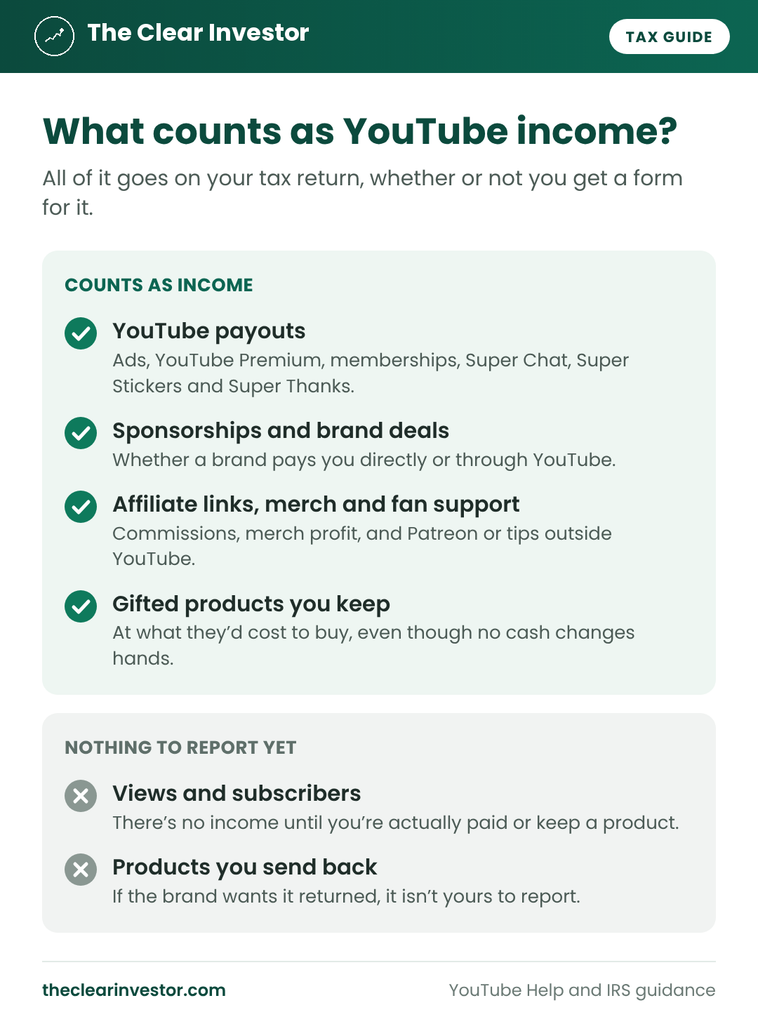
For YouTube taxes, everything you’re paid for your channel counts, not just AdSense:
| Income | Who pays you | Tax form you may get |
|---|---|---|
| Ads, YouTube Premium, memberships, Super Chat, Super Stickers and Super Thanks | Google, through AdSense for YouTube | Form 1099-MISC, box 2 |
| Sponsorships and brand deals | The brand or its agency | Form 1099-NEC at $2,000 or more |
| Affiliate links | The affiliate program | Depends on the program |
| Merch, Patreon and tips outside YouTube | Your store or the platform | Depends on the platform |
| Gifted products you keep | The brand, in products instead of cash | Usually none |
Gifted products are the part of YouTube taxes most creators miss. When a brand sends you something to feature, it’s paying you in products instead of cash. The IRS treats that like bartering: the fair market value of what you receive is income. So a $500 camera a brand sends you to review is $500 of income, even though no money changed hands. If the brand wants it back and you return it, there’s nothing to report.
Does YouTube Send a 1099?
Yes, if you’re a monetized creator in the US, and the form is where YouTube taxes get confusing. Here’s how it works.
The form is a 1099-MISC, not a 1099-NEC. Google’s page on US tax requirements for YouTube earnings says the 1099-MISC for US creators is “typically issued by early March.” It lists YouTube Partner Program earnings as “Other Copyright Royalties,” and creators report seeing them in box 2, Royalties, on the form.
Almost every monetized creator gets one. Most 1099 forms are only required once a company pays you $2,000 or more in a year, but royalties in box 2 are reported from just $10.
You choose online or paper delivery in your tax info settings in AdSense for YouTube. The form stays available online either way.
Nothing is withheld if your tax info is on file. Google’s page says it “will not withhold taxes on earnings if you’ve provided valid tax info.” If you never submit a Form W-9, “backup withholding will apply and 24% of total earnings worldwide will be withheld.” That tax shows up in box 4 of your 1099-MISC, and it counts as tax you’ve already paid when you file. Google asks you to submit your tax info by December 10 each year.
Brands send their own form. A brand or agency that pays you $2,000 or more in a year sends a Form 1099-NEC. Under that, you may not get anything.
In a multi-channel network? If the network pays you instead of Google, your earnings and any tax form usually come from the network. Google has a separate page on tax requirements for networks.
No form doesn’t mean no tax. The IRS says income has to be reported even if you don’t get a 1099.
Schedule C, Schedule E or a Hobby: Where YouTube Taxes Go
Because Google calls your earnings royalties, tax software often steers you to the wrong form. TaxAct’s own help page says box 2 royalties are “generally reported on Schedule E,” and Schedule E doesn’t include self-employment tax.
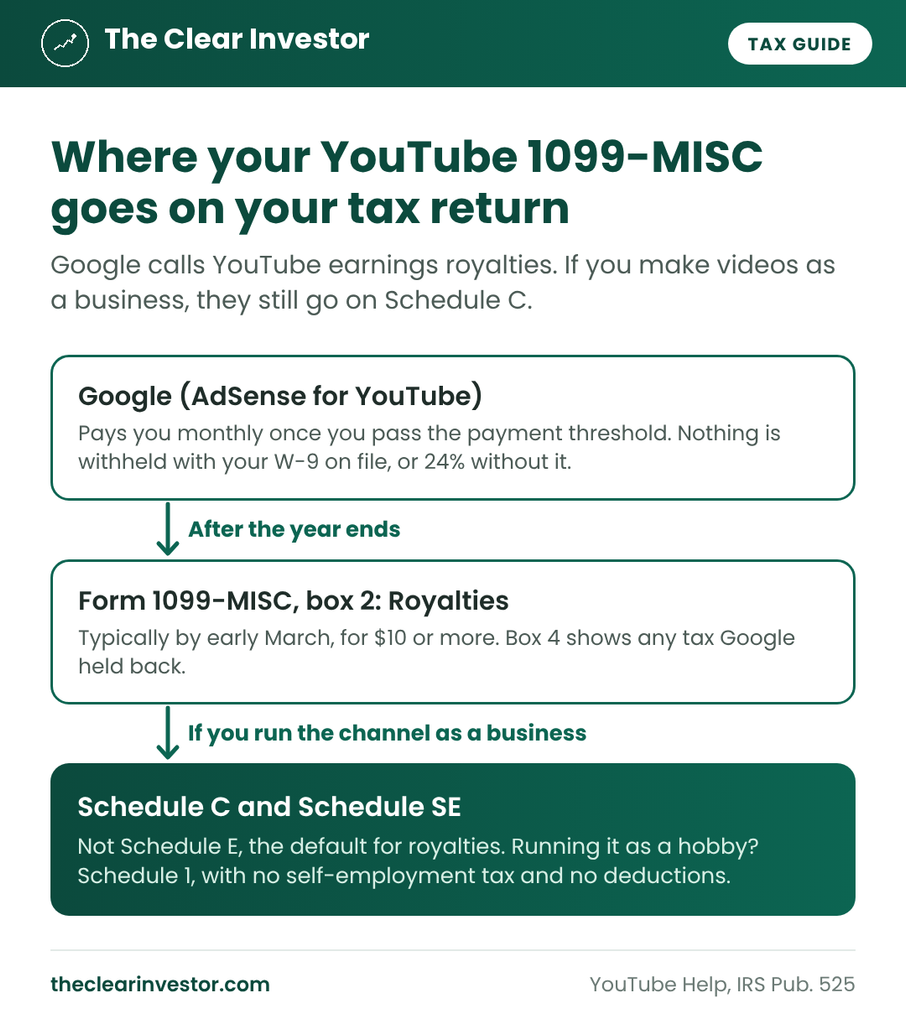
But IRS Publication 525 has an exception. As TaxAct’s royalties summary quotes it, royalties go on Schedule E in most cases, “however, if you… are in business as a self-employed writer, inventor, artist, etc., report your income and expenses on Schedule C.” If you make your own videos to earn money, you’re the artist, so your YouTube income goes on Schedule C, with self-employment tax.
The third option is a hobby. If you don’t run your channel to make a profit, the income goes on Schedule 1 as “activity not engaged in for profit” income. You skip self-employment tax, but you can’t deduct a single expense. The IRS looks at things like whether you run it in a businesslike way, put in regular time, track income and expenses, and work to make it profitable.
| Business (Schedule C) | Hobby (Schedule 1) | |
|---|---|---|
| Who it’s for | Creators running a channel to make money | Channels not run for profit |
| Self-employment tax | Yes, once profit is about $433 | No |
| Channel expenses | Deductible | Not deductible |
| Qualified business income deduction | Yes | No |
Schedule E is for royalties you didn’t create through your own work, like a copyright you bought, so it doesn’t fit a creator making their own videos.
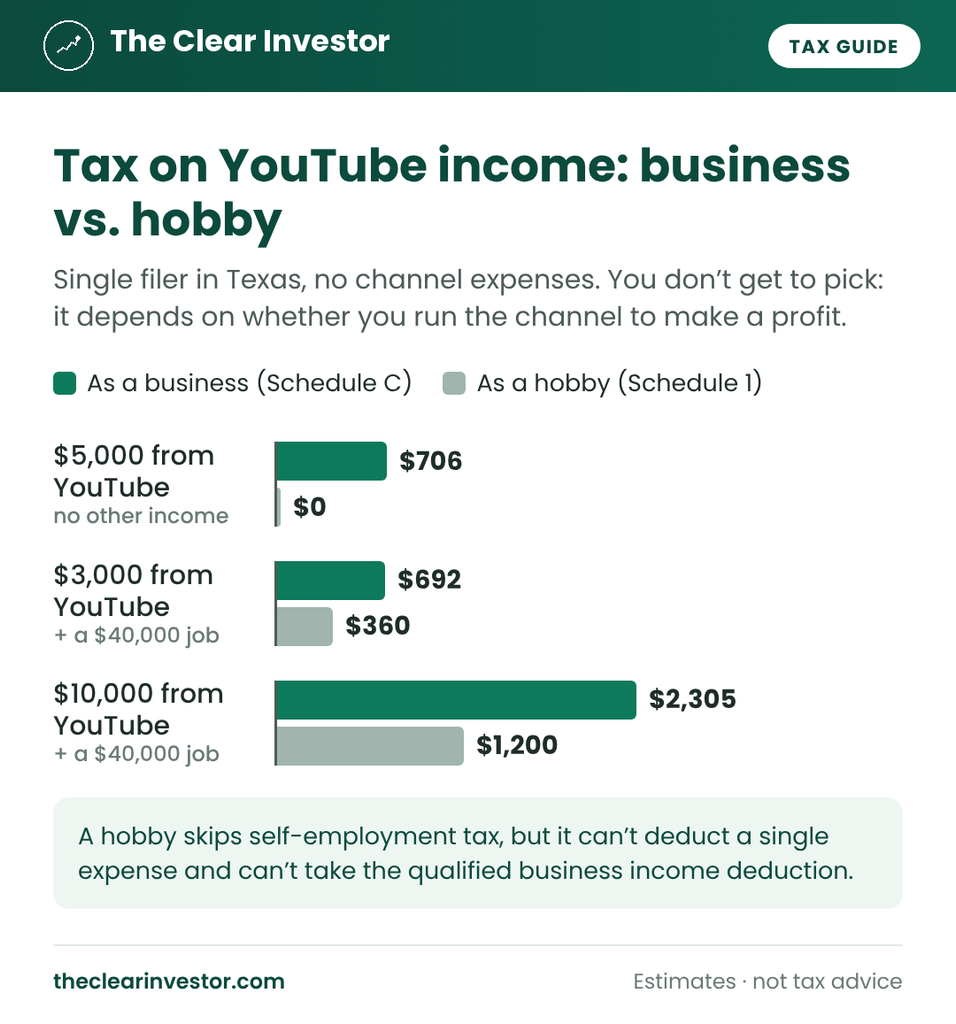
A hobby can look cheaper, but you don’t get to pick it to save tax. And once you have real expenses, a business usually wins: with $3,000 of payouts, $2,500 of equipment and a $40,000 job, my calculator shows $115 of tax as a business vs. $360 as a hobby.
How Much Tax Will You Owe on YouTube Income?
Here’s what YouTube taxes look like for a single filer in Texas, which has no state income tax, running the channel as a business with no expenses:
| YouTube income | No other income | With a $40,000 W-2 job | With a $90,000 W-2 job |
|---|---|---|---|
| $3,000 | $424 | $692 | $915 |
| $5,000 | $706 | $1,153 | $1,524 |
| $10,000 | $1,413 | $2,305 | $3,049 |
| $15,000 | $2,119 | $3,458 | $4,573 |
With no other income, it’s about 14%, all self-employment tax, until your income passes your standard deduction. A $40,000 job puts every YouTube dollar in the 12% bracket, so it’s about 23%. A $90,000 job puts it in the 22% bracket, so it’s about 30%.
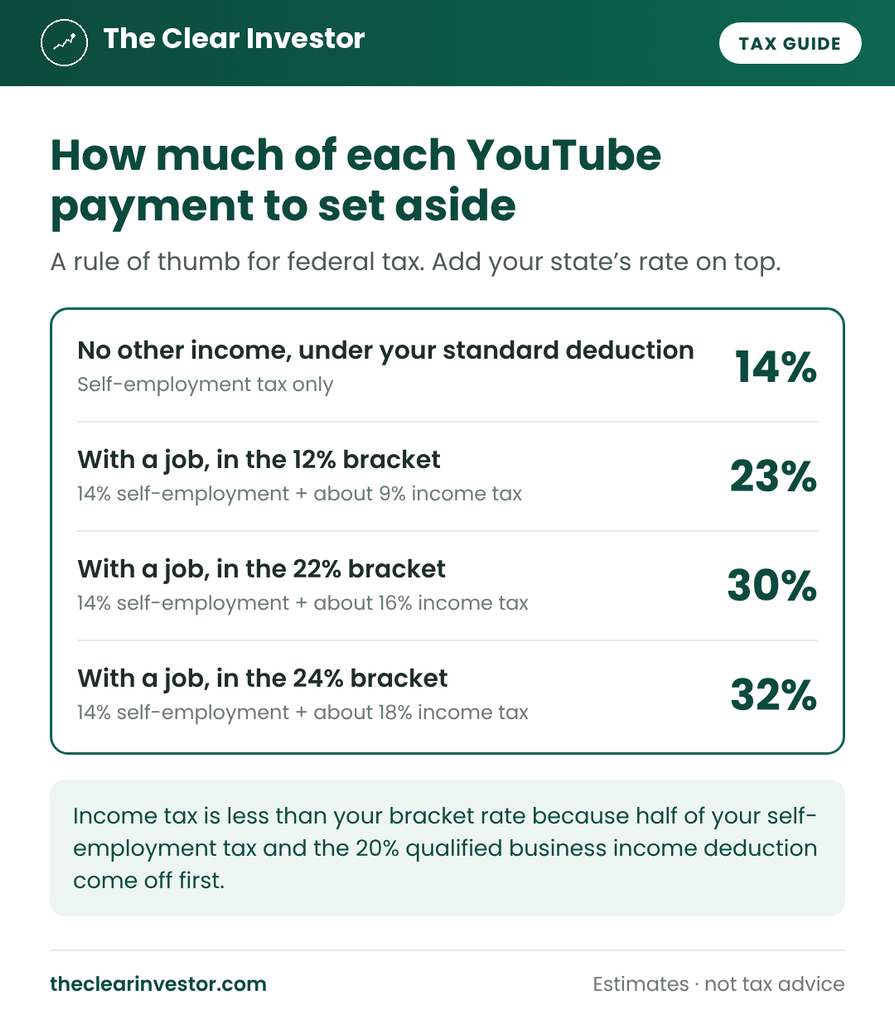
So, from each payment, set aside:
| Your situation | Federal tax to set aside |
|---|---|
| No other income, under your standard deduction | About 14% |
| A job in the 12% bracket | About 23% |
| A job in the 22% bracket | About 30% |
| A job in the 24% bracket | About 32% |
Add your state’s rate on top. Gifted products raise the amount too, since you owe tax on them with no cash to set it aside from: $500 of products with a $40,000 job adds about $115. Channel expenses lower it. The YouTube tax calculator handles all of that and gives you one percentage, state included.
Do You Need to Pay YouTube Taxes Quarterly?
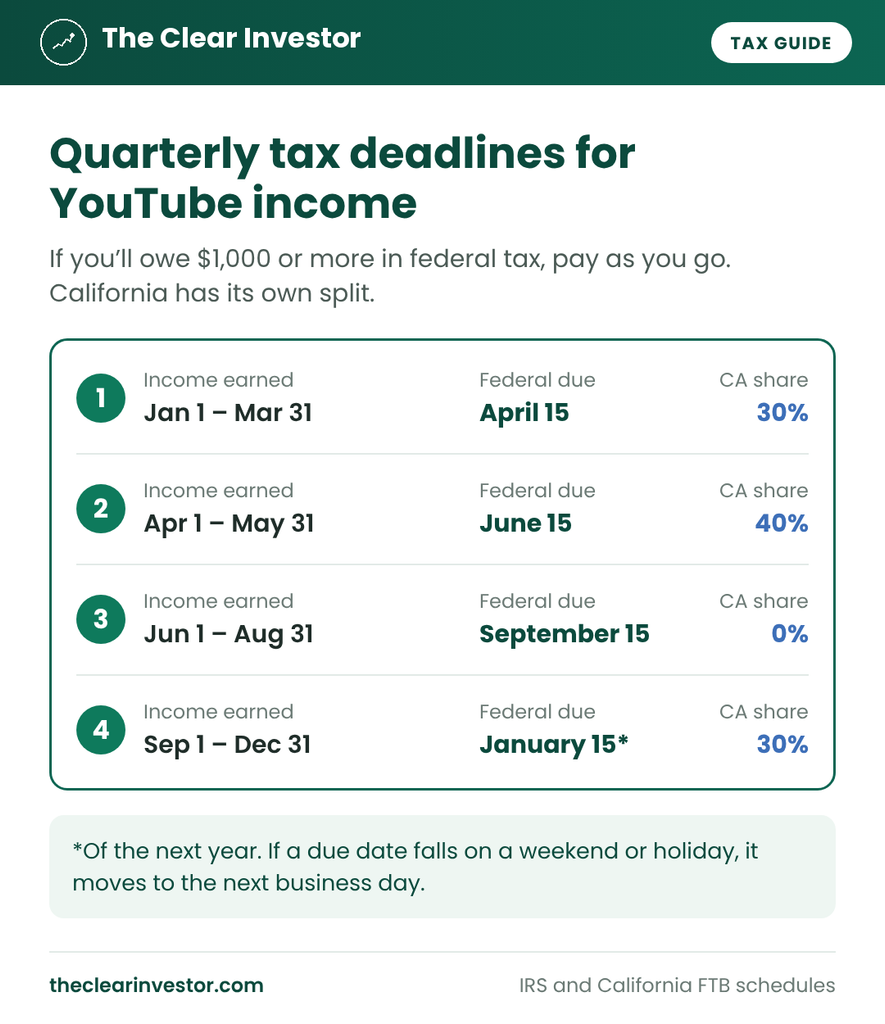
Once your channel takes off, probably. The IRS expects estimated tax payments when you’ll owe $1,000 or more when you file. With no other income, self-employment tax alone reaches $1,000 at about $7,100 of profit.
AdSense pays monthly. Google pays creators “by the 21st or 26th each month” once your balance passes the payment threshold, so set aside your percentage each month, not at tax time.
If a video goes viral, your income can jump in one quarter. The annualized method on Form 2210 can lower or remove a penalty for the quarters when you earned less.
The safe harbor that keeps you penalty-free, and how to raise your W-4 withholding instead if you have a job, are in how quarterly payments work. If you’re in California, note that the state splits its payments differently.
Free tax tracker + deadline reminders
Get my free side income tax tracker
Sign up and I’ll send you my Google Sheets tracker that shows how much of each payout to set aside. You’ll also get an email before each quarterly tax deadline (Jan 15, Apr 15, Jun 15 and Sep 15), plus my new guides. Unsubscribe anytime.
Earn on several platforms or drive for work? Get the full 1099 Side Income Tracker ($12) →
Deductions That Lower Your YouTube Taxes
As a business, your channel costs come off your profit before either tax is figured, so every receipt lowers your YouTube taxes. Common ones:
- Camera, microphone, lights and the computer you edit on. Under the IRS’s de minimis safe harbor, items that cost $2,500 or less each can usually be deducted in full the year you buy them. Pricier gear can often still be written off right away with Section 179 or bonus depreciation. If you also use it personally, deduct only the business share.
- Editing software, music licenses and stock footage.
- Editors, thumbnail designers and other freelancers. If you pay one person $2,000 or more in a year, you may need to send them a Form 1099-NEC.
- Props and products you buy for videos.
- Travel to film, like the mileage to a shoot location.
- A home office you use regularly and only for your channel. The IRS’s simplified option is $5 per square foot, up to 300 square feet.
- The business share of your internet and phone.
- Ads you run to promote your channel.
Two more come automatically: half of your self-employment tax comes off your income, and the qualified business income deduction takes up to 20% of your profit off your taxable income. None of these apply if your channel is a hobby. Here are more deductions that lower side hustle taxes.
YouTube Taxes: How to Report Your Earnings
- Download your 1099-MISC from AdSense for YouTube and check box 2 against the payments in your AdSense transactions.
- Add everything without a form: brand deals under $2,000, affiliate income, merch and fan support, and gifted products at what they’d cost to buy.
- Report the total on Schedule C as gross receipts on line 1. Your channel expenses go in Part II.
- Assign the 1099-MISC to your Schedule C, not to Schedule E.
- Figure self-employment tax on Schedule SE once your profit is about $433 or more. Half of it comes back as a deduction.
- Take the qualified business income deduction on Form 8995. Tax software does this for you.
- Claim any tax Google held back (box 4) as tax withheld from Forms 1099, and subtract any estimated payments you made.
I file with TaxAct. Add a Schedule C for your channel first, then enter the 1099-MISC, type in the box 2 amount, and assign the form to that Schedule C, as TaxAct’s 1099-MISC help page describes. If you also do other 1099 work, like Outlier, that’s a different line of work, so it usually gets its own Schedule C.
Special Situations
A few situations change your YouTube taxes.
If your channel isn’t monetized yet
If you haven’t been paid and haven’t kept any gifted products, there’s no YouTube income to report. If you’re building the channel as a business, your costs can create a loss that lowers the tax on your other income. For example, $500 of payouts, $3,000 of equipment and a $40,000 job in California saves about $400 in tax. But the IRS looks harder at channels that lose money year after year, so keep receipts and run it like a business.
If Google held back 24%
That money isn’t lost. It’s in box 4 of your 1099-MISC and comes off your tax bill when you file. With $5,000 of payouts and no other income, Google would hold back $1,200 against about $706 of tax, so about $494 comes back as a refund. Submit your Form W-9 in AdSense for YouTube to stop it going forward.
If you get Super Chats or Super Thanks
The new deduction for tips can cover part of your YouTube income. The IRS lists digital content creators, including streamers and online video creators, as a job that customarily gets tips. Under the final rules from April 2026, a voluntary payment that isn’t required to see your content can be a qualified tip, even if it comes with a highlighted message. That fits Super Chat, Super Stickers and Super Thanks. Memberships don’t count, since they pay for access to perks, and the share YouTube keeps isn’t your tip.
The deduction is up to $25,000 a year from 2025 through 2028, but no more than your channel’s profit, and it shrinks by $100 for every $1,000 of income over $150,000 ($300,000 married filing jointly). It lowers federal income tax only. You still owe self-employment tax on the full amount, and you claim it on Schedule 1-A with a Social Security number. Google’s 1099-MISC shows your YouTube earnings as one total, so keep the YouTube Studio revenue report that breaks these out.
One open question: the law leaves out tips earned in certain service fields, like the performing arts, and the IRS hasn’t written those rules yet. Until it does, it treats people in listed tipped jobs as eligible. My YouTube tax calculator has a box for these payments and shows what the deduction saves you.
If it’s your kid’s channel
AdSense accounts need an adult, so a parent’s name is often on the 1099-MISC. Who reports the income depends on who really earns it. A child whose net self-employment earnings are $400 or more has to file their own return, and IRS Publication 501 covers the dependent rules. This one is worth asking a tax pro about.
If you live outside the US
Google withholds US tax on earnings from US viewers, at a rate that depends on your country’s tax treaty. This guide and my calculator cover US creators only.
Common YouTube Tax Mistakes
These are the YouTube tax mistakes I’d watch for:
- Putting box 2 royalties on Schedule E. If you make videos as a business, it belongs on Schedule C, with self-employment tax.
- Forgetting gifted products. Products you keep are income at what they’d cost to buy.
- Leaving out brand deals with no form. Under $2,000, you may not get a 1099-NEC, but it’s still income.
- Skipping your tax info in AdSense. Without a W-9, Google holds back 24% of everything.
- Spending every payment. Set aside your percentage from each monthly payout and each brand deal.
- Deducting personal use. If your camera also shoots family trips, deduct only the business share.
- Not keeping records. Save your AdSense payment history, brand contracts and receipts. The IRS says to keep records for 3 years after you file in most cases.
My Verdict: Do You Have to Pay Taxes on YouTube?
Yes. YouTube taxes start once your profit passes about $433, and with a job, from the first dollar. Google sends a 1099-MISC that calls your earnings royalties, but if you make videos as a business, they go on Schedule C with self-employment tax. Count your brand deals and gifted products too, deduct your channel costs, and set aside about 14% of every payment with no other income, or about 23% with a job in the 12% bracket, plus your state’s rate.
The rules every side hustle shares, like quarterly payments, deductions and when you have to file, are in my side hustle taxes guide.
Want to earn while you grow your channel? Read my honest Handshake AI review and how Handshake AI taxes work, or see every platform I’ve used in How I make money online.
FAQ
Do small YouTubers have to pay taxes?
Yes, once you’re paid. With no other income, you owe nothing until your profit passes about $433. With a job, every dollar is taxed.
How much does YouTube take out for taxes?
Nothing, once your US tax info is on file. Without it, Google holds back 24% of your earnings.
Does YouTube send a 1099?
Yes. Google sends US creators a Form 1099-MISC, typically by early March. Box 2 royalties are reported from just $10.
Why does my YouTube 1099 say royalties?
Google treats YouTube Partner Program earnings as copyright royalties. If you make videos as a business, they still go on Schedule C, with self-employment tax.
Is YouTube income self-employment income?
Yes, if you run your channel as a business. If it’s truly a hobby, it goes on Schedule 1 instead, with no self-employment tax and no deductions.
Are gifted products from brands taxable?
Yes. Products you keep are income at what they’d cost to buy, usually with no form.
How much should I set aside for YouTube taxes?
About 14% if it’s your only income, and about 23% with a job in the 12% bracket, plus your state’s rate.
Can I deduct my camera and computer?
Yes, the business share, if you run your channel as a business. Items up to $2,500 each can usually be deducted in full the year you buy them.
Do I owe taxes if my channel isn’t monetized?
Not until you’re paid or keep a gifted product. Before that, there’s no income to report.
Are Super Chats taxable?
Yes. They’re income with self-employment tax, like the rest of your YouTube pay. But Super Chats, Super Stickers and Super Thanks can count as qualified tips, which lowers your federal income tax. Channel memberships can’t, since they pay for access.
I’m not a licensed financial advisor or tax professional. This guide is based on Google’s YouTube help pages, IRS rules and my own experience filing 1099 income. It’s for educational purposes and isn’t tax advice. Tax rules change, so check the links above or talk to a tax professional about your situation. I’m not affiliated with YouTube, Google or TaxAct.