
This Amazon Flex earnings calculator reads your Flex log and shows what you make per day, per week, per month and per hour, before and after gas, plus your best days of the week and your mileage deduction. Upload a CSV from my Amazon Flex Earnings & Mileage Log spreadsheet, or any log with a date column and a pay column.
When I drove Flex, I logged every day in a spreadsheet, one file a month, and wrote a small script to add the months up. The Flex app shows your payouts, but not what you average after gas or which days pay best. This does that math for your whole log at once, right in your browser.
Amazon Flex Earnings Calculator
Upload your Flex log and see what you made per day, per week, per month and per hour, your best days of the week and your mileage deduction.
Step 1: Add your log
Or paste your rows
Your averages
| Average | Earned | After gas |
|---|
Your days
Your best days of the week
| Day | Days worked | Per day | Per hour after gas |
|---|
Month by month
| Month | Days | Earned | After gas | Per hour after gas |
|---|
Your mileage deduction
How this is calculated
- Earned = pay + tips for each day. A day counts as worked when it has pay.
- Days off = the days between your first and last logged day with no pay.
- Per week and per month = what you earned ÷ the number of days from your first to your last logged day, × 7 or × 30.4.
- A full year at this pace = the same daily average × 365. It shows once your log covers 4 weeks or more.
- After gas = earned minus gas, and minus parking and tolls if your log has them. Per hour uses the hours in your log.
- Mileage deduction = business miles × the IRS standard mileage rate for the date you drove: 70 cents in 2025, 72.5 cents from January to June 2026 and 76 cents from July 1, 2026.
- Self-employment tax = 15.3% of 92.35% of your profit (earned minus the mileage deduction and parking and tolls). It applies once your profit for the year passes about $433.
It reads columns by their names: a date, pay or earnings, and if you have them, tips, hours, gas or fuel, miles, blocks, parking and tolls, and notes. A note that says "Day off" marks a day off. For your yearly tax with your other income, use my Amazon Flex tax calculator.
Free tax tracker + deadline reminders
Get my free side income tax tracker
Sign up and I’ll send you my Google Sheets tracker that shows how much of each payout to set aside. You’ll also get an email before each quarterly tax deadline (Jan 15, Apr 15, Jun 15 and Sep 15), plus my new guides. Unsubscribe anytime.
Earn on several platforms or drive for work? Get the full 1099 Side Income Tracker ($12) →
Table of Contents
How to Use the Amazon Flex Earnings Calculator
There are two steps: add your log, then check what the calculator found.
Step 1: Add your log
- Get your log as a CSV file. Using my spreadsheet? Open the Daily Log tab. In Google Sheets, choose File > Download > Comma-separated values (.csv). In Excel, choose File > Save As and pick CSV. Keep your own log? Export it as a CSV the same way.
- Upload it. Choose the file or drop it on the box. If you keep one file per month, pick them all at once, and the calculator puts them together by date.
- Or paste your rows. Copy them from Google Sheets or Excel, with the header row, and paste them in.
- No log yet? Click “Try a sample log” to see 12 weeks of made-up Flex days from January to March 2026.
Step 2: Check your log
- Read what it found. It lists your days with pay, your first and last dates and the columns it used. If a column is missing, check its name in your header row.
- Pick your dates. Change From and To to look at one month, a season or just this year.
- The station box. It shows up if your log has a station miles column. Leave it unchecked unless your home is your principal place of business, since IRS Publication 463 treats the drive between home and a regular work location as commuting.
The calculator reads your columns by their names, so their order doesn’t matter:
| What it looks for | Column names it reads |
|---|---|
| Date (required) | Date or Day |
| Pay (required) | Block pay, Earnings, Pay, Income, Amount, Earned or Total |
| Tips | Tips |
| Hours | Hours, Hours worked or Hrs |
| Gas | Gas or Fuel |
| Miles | Miles, Mileage, Delivery miles or Distance |
| Station miles | Station miles or Commute miles |
| Blocks | Blocks |
| Parking and tolls | Parking or Tolls |
| Notes | Notes. “Day off” marks a day off, and “2 blocks” marks a double-block day. |
Dates can look like 1/5/2026, 2026-01-05, Jan 5, 2026 or Mon 1/5/2026. If your dates are just day numbers, put the month and year in the file name, like “January 2026.csv“. Hours can be 4.5 or 4:30, and dollar signs and commas are fine.
Who This Calculator Is For
The Amazon Flex earnings calculator is built for US Flex drivers who keep a log of their days. It’s most useful if you:
- Use my spreadsheet and want your averages and best weekdays without building them yourself.
- Keep your own log in Google Sheets, Excel or another app that can export a CSV.
- Want a weekly or monthly number you can count on for rent and bills.
- Are picking which days to drive and want to know which ones pay best for you.
- Want to know your mileage deduction before tax time.
Checking one offer before you take it? That’s what my Amazon Flex pay calculator is for.
How to Read Your Results
The Amazon Flex earnings calculator shows your results in five main parts.
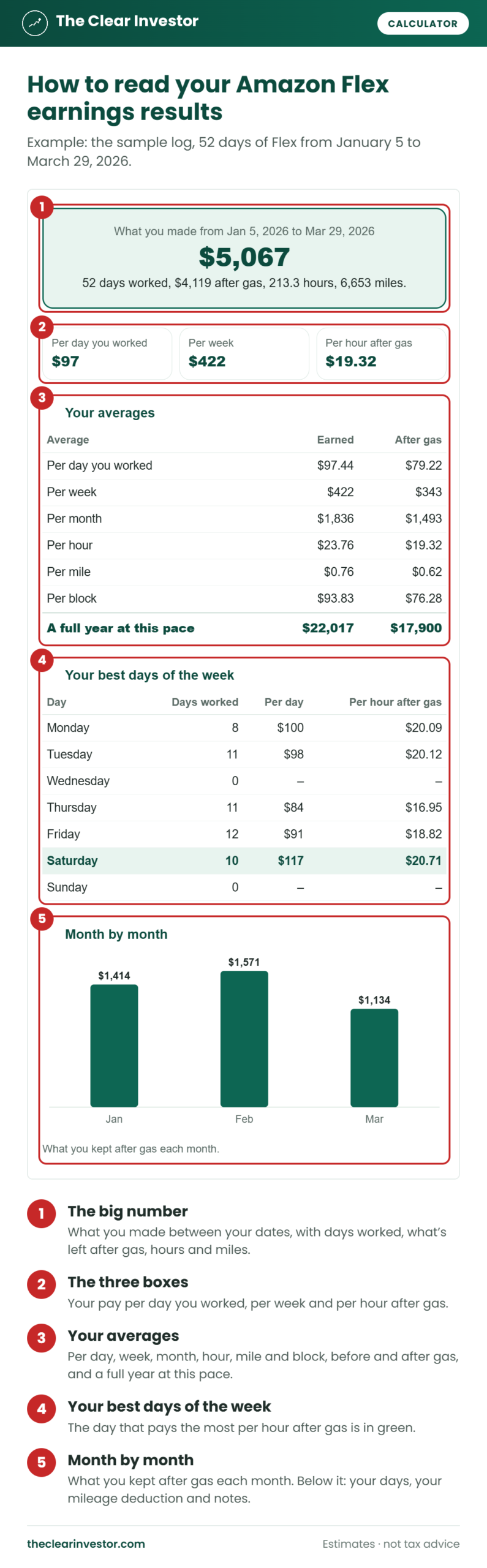
- The big number is what you made between your dates, with your days worked, what’s left after gas, your hours and your miles.
- The three boxes show your pay per day you worked, per week and per hour after gas.
- Your averages break it down per day, week, month, hour, mile and block, before and after gas. Once your log covers 4 weeks, it adds a full year at this pace.
- Your best days of the week show your days worked, pay per day and pay per hour after gas for each weekday. The best one is in green.
- Month by month charts what you kept after gas each month, with a table below it.
Below those are your days (days off, blocks, hours, miles and gas per day, and your best day), your mileage deduction with the self-employment tax on what’s left, and notes on your gas, miles and tips.
Worked Example 1: Your Averages From 12 Weeks of Flex
This is the sample log: January 5 to March 29, 2026, with 52 days worked and 32 days off. Most days are one block of about 4 hours, two Saturdays are double-block days, and every day includes a 24-mile round trip to the station.
| Result | Amount |
|---|---|
| Earned | $5,067 |
| Gas | $948 |
| After gas | $4,119 |
| Hours | 213.3 |
| Per day you worked | $97.44 |
| Per week | $422 |
| Per month | $1,836 |
| Per hour after gas | $19.32 |
| A full year at this pace | $22,017 |
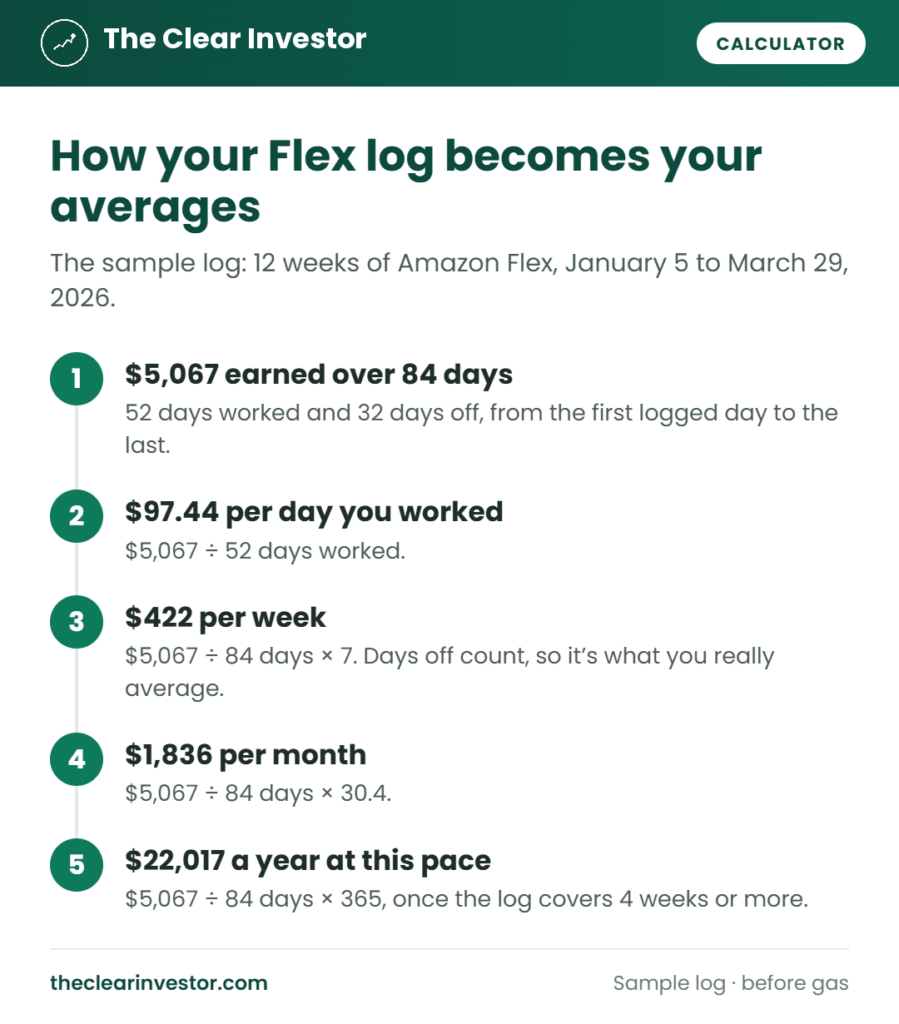
The per week number is lower than a week of driving would suggest. Five days at $97 would be $487, but this driver averaged 4.3 days a week, since days off count. That’s why the calculator divides by every day from your first logged day to your last, not just the days you worked.
Worked Example 2: Your Best Days of the Week
The same sample log, split by weekday. This driver didn’t drive on Wednesdays or Sundays.
| Day | Days worked | Per day | Per hour after gas |
|---|---|---|---|
| Monday | 8 | $100 | $20.09 |
| Tuesday | 11 | $98 | $20.12 |
| Thursday | 11 | $84 | $16.95 |
| Friday | 12 | $91 | $18.82 |
| Saturday | 10 | $117 | $20.71 |
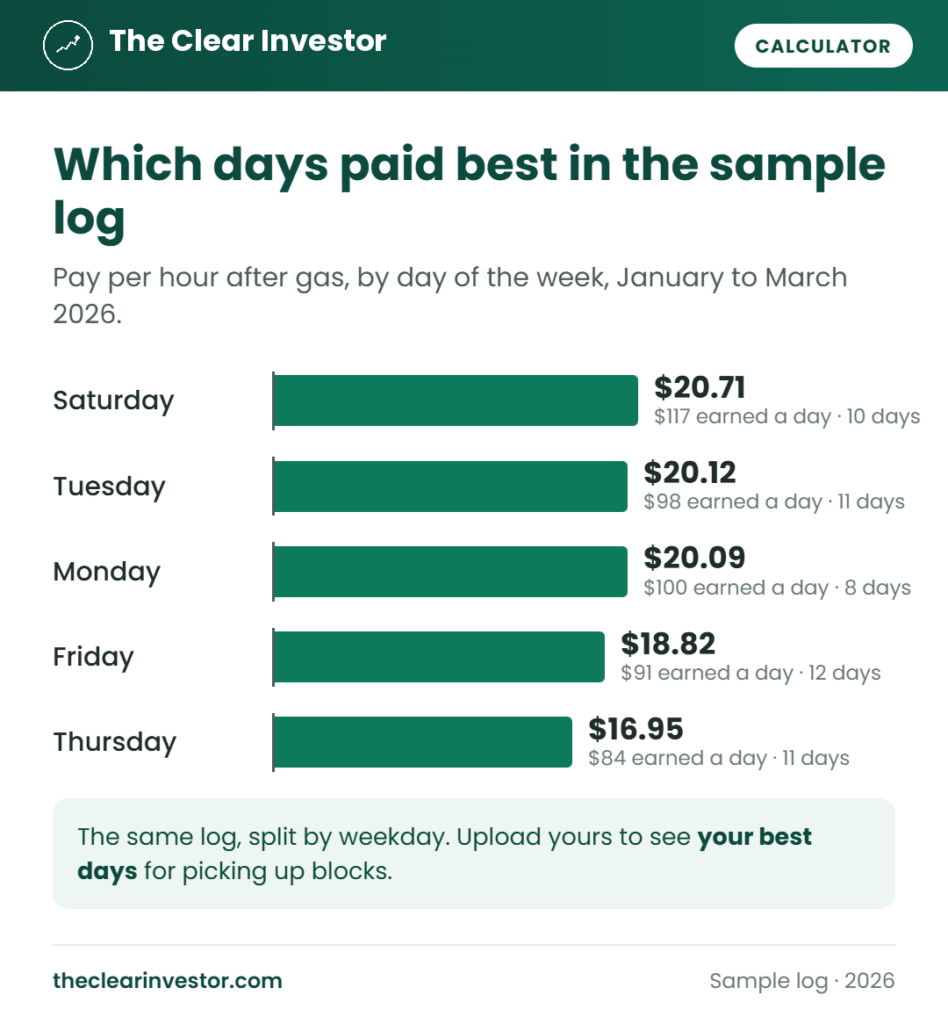
Saturday pays the most per day because of the double-block days, and it still comes out on top per hour after gas. Thursday trails by almost $4 an hour. The calculator ranks days by pay per hour after gas, so a long day that pays more but takes twice the hours doesn’t win by default. A weekday needs at least 2 days in your log to be ranked.
Worked Example 3: The Mileage Deduction
The sample log has 5,405 delivery miles and 1,248 station miles. Every mile is from January to March 2026, so they’re worth the 72.5-cent IRS standard mileage rate.
| Step | Amount |
|---|---|
| Earned | $5,067 |
| Mileage deduction (5,405 delivery miles × 72.5¢) | −$3,919 |
| Profit for taxes | $1,148 |
| Self-employment tax (15.3% of 92.35%) | $162 |
The deduction is about four times what the gas cost, since the rate also covers insurance, repairs and the value your car loses. You don’t deduct gas on top of it. The station miles stay out, because the IRS usually treats them as commuting. Checking the station box would raise the deduction to $4,823, so only check it if your home is your principal place of business.
More Example Results
Here’s what your Amazon Flex earnings come to per month, by how many days a week you drive and what you average per day you work. It’s before gas, with days off counted:
| Days a week | $80 a day | $100 a day | $120 a day |
|---|---|---|---|
| 2 | $696 | $870 | $1,044 |
| 3 | $1,044 | $1,304 | $1,565 |
| 4 | $1,391 | $1,739 | $2,087 |
| 5 | $1,739 | $2,174 | $2,609 |
| 6 | $2,087 | $2,609 | $3,131 |
A year is about 52 weeks, so 4 days a week at $100 a day comes to about $20,857 a year before gas. Your own log shows what you really average, including the weeks you take off.
How the Amazon Flex Earnings Calculator Works
The Amazon Flex earnings calculator does all its math in your browser, from the rows in your log.
Reading your file. It finds the header row by looking for a date column and a pay column in the first rows of the file, then reads the other columns by name. Rows with the same date are added together, so two rows for a double-block day count as one day. A row whose note starts with “Example” is skipped.
Days worked and days off. A day with pay or tips counts as worked. Every other day between your first and last logged day counts as a day off, whether it says “Day off” or is just blank.
Your averages. Per day you worked is what you earned divided by your days worked. Per week and per month divide what you earned by every day in your log, then multiply by 7 or by 30.4, the average month. A full year at this pace multiplies the same daily average by 365.
After gas. What you earned minus gas, and minus parking and tolls if your log has them. Per hour uses the hours in your log, and per mile uses all your miles, the drive to the station included.
Mileage deduction. Your business miles times the IRS standard mileage rate for the day you drove: 70 cents in 2025, 72.5 cents from January to June 2026 and 76 cents from July 1, 2026. Station miles only count if you check the box.
Self-employment tax. 15.3% of 92.35% of your profit, where profit is what you earned minus the mileage deduction and any parking and tolls. It applies once your profit for the year is past about $433.
What the Calculator Leaves Out
It only knows what’s in your log, so a day you drove but didn’t log counts as a day off, and a log with no gas or hours column can’t show pay after gas or per hour. “After gas” doesn’t count insurance, repairs or what your car loses in value, so driving really costs you more. A full year at this pace assumes you keep the same pace, while Flex offers change with the season. It also doesn’t work out your income tax. For that, with your other income and deductions, use my Amazon Flex tax calculator.
Tips for Accurate Results
To get the most out of the Amazon Flex earnings calculator:
- Log every day you drive, even short ones. In my spreadsheet, a day with no pay counts as a day off, so you don’t have to type those in.
- Keep station miles in their own column, so your mileage deduction only counts delivery miles.
- Write down your odometer at the station and at your last stop. The IRS wants a record of your business miles, and Publication 463 explains what to keep.
- Use full dates, like 1/5/2026, or put the month and year in each monthly file’s name.
- Upload all your months at once to see your whole year, then use From and To to compare seasons.
- Run it again every month to see whether your averages are going up or down.
What to Do With Your Result
- Drive on your best days when you can, and skip the ones that pay the least per hour.
- Set a weekly goal from your real per week number, not from a single good week.
- Check the pay on offers against your per hour after gas with my Amazon Flex pay calculator.
- Set money aside for taxes. Here’s how Amazon Flex taxes work, from the 1099-NEC to the mileage deduction.
Amazon Flex Earnings Calculator FAQ
How much do Amazon Flex drivers make a week?
It depends on how many days you drive and what the offers pay. [Amazon says](https://flex.amazon.com/faq) most delivery partners earn $18 to $25 an hour, before gas. The sample log averages $422 a week at 4.3 days a week. Upload your log to see yours.
How do I calculate my Amazon Flex earnings per hour?
Divide what you earned by the hours you worked. For pay after gas, take out what you spent on gas first. The calculator does this for your whole log and for each weekday.
Does it work with my own spreadsheet?
Yes. Any CSV file with a date column and a pay column works. It also reads tips, hours, gas, miles, blocks, parking and tolls, and notes if your log has them.
Is my log uploaded anywhere?
No. The file is read in your browser and never leaves your device. Nothing is saved after you close the page.
Can I upload more than one month?
Yes. Pick all your monthly files at once, and the calculator puts them together by date.
Why is my per week number lower than a normal week?
It counts every day from your first logged day to your last, days off included. That makes it what you really average, not what a full week of driving pays.
What tax year does the Amazon Flex earnings calculator use?
It uses the IRS mileage rate for each day you drove: 70 cents in 2025, 72.5 cents from January to June 2026 and 76 cents from July 1, 2026. I update it every year.
Estimates for educational purposes only. I’m not a licensed financial advisor or tax professional, and this isn’t tax advice. Not affiliated with Amazon.