
Last updated November 2026
I built my tax calculators from IRS forms and instructions, and each one is set up for its platform’s pay, fees and tax forms: pounds for Prolific, gift cards for Crowdtap, business or hobby for YouTube. This page explains the math, with every number and source, so you can check any result my tax calculators give you.
I have a computer science degree and I’m a Certified Financial Education Instructor (CFEI). Still, think of these tax calculators as careful estimates, not a tax return.
My tax calculators at a glance:
- Tax year: 2026, the return you’ll file in early 2027.
- What they figure: Federal income tax, self-employment tax, the child tax credit, and state income tax for all 50 states and DC.
- What you get: The extra tax one platform adds to your bill, and the share of each payout to set aside.
- Cost: Free, with no email or sign-up.
- Privacy: Everything runs in your browser. Nothing you type is saved or sent anywhere.
Table of Contents
What My Tax Calculators Show You
Each calculator gives you the same layout, so once you’ve used one, you can read any of them:
- The big number is the extra tax that platform adds to your bill, with the percentage of each payout to set aside.
- Three boxes split it into federal income tax, self-employment tax and state tax.
- Left to pay appears if you entered tax already withheld or estimated payments you’ve made.
- Notes tell you which tax form to expect, whether you have to file, and anything specific to your state.
- Before vs. after deductions shows your whole tax bill with and without the standard deduction and the qualified business income deduction, so you can see what they save you.
- How your taxable income is worked out walks from your income down to your federal taxable income, line by line.
The Key Idea: Your Tax With and Without the Platform
My tax calculators don’t apply a flat rate to your earnings. They figure your whole tax bill twice: once with your earnings from that platform, and once without them. The difference is the tax that platform adds.
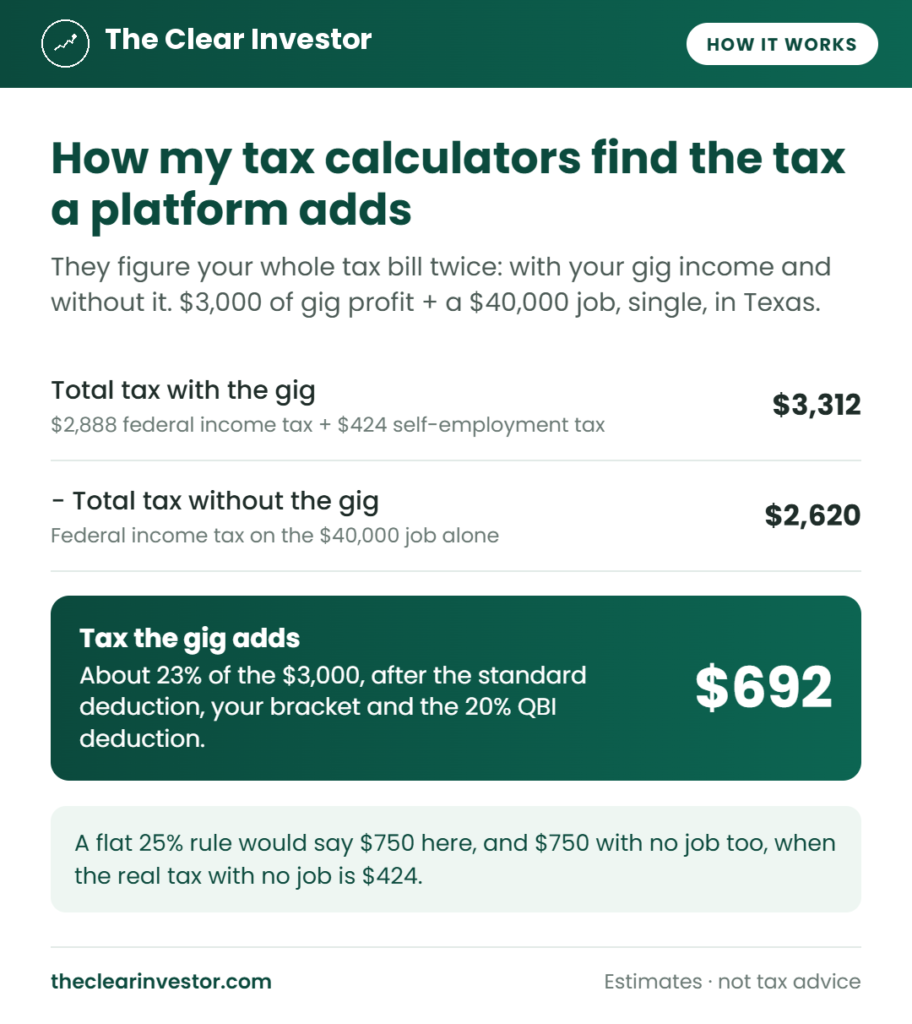
Here’s what that looks like for $3,000 of gig profit next to a $40,000 W-2 job, for a single filer in Texas, which has no state income tax:
| Step | Amount |
|---|---|
| Total tax with the gig: $2,888 federal income tax + $424 self-employment tax | $3,312 |
| Total tax without the gig: federal income tax on the job alone | $2,620 |
| Tax the gig adds | $692, about 23% |
Doing it this way means your standard deduction, your bracket and your other income all count. Compare it with two shortcuts you’ll see in other tax calculators:
| Method | Same person, $3,000 + a $40,000 job | $3,000, no other income |
|---|---|---|
| A flat 25% “set aside” rate | $750 | $750 |
| 15.3% of everything you earned | $459 | $459 |
| With and without, the way mine work | $692 | $424 |
The flat rate is too high in the 12% bracket, and far too high for someone with no job, whose income tax is $0. In the 22% bracket and up, it’s too low. The 15.3% shortcut leaves out income tax and skips the 92.35% step. With and without gets both right.
Your W-2 job’s own tax is the same in both runs, so it cancels out. That’s why the calculators don’t ask what your job withholds. They assume your job’s withholding covers your job’s tax.
Step 1: Turning Your Earnings Into Income
Each calculator asks for what that platform actually shows you, then turns it into one dollar amount:
| Platform type | What you enter | How it becomes income |
|---|---|---|
| Paid in pounds (Prolific) | Earnings in pounds and in dollars, plus an exchange rate | Pounds × rate, plus your dollar earnings |
| AI training and paid studies (like Outlier AI) | Pay and bonuses | Added together as business income |
| Survey and receipt rewards (like Crowdtap) | Rewards you redeemed | Counted at face value as other income |
| Creators (YouTube, TikTok) | Payouts, brand deals and gifted products | Added together, with gifted products at what they’d cost to buy |
Then the kind of income decides where it goes, the same way it does on your return:
- Business income goes on Schedule C, minus any expenses you enter. It gets self-employment tax and the qualified business income deduction.
- Rewards go on Schedule 1 as other income. There’s no self-employment tax, no qualified business income deduction and no expenses.
- Hobby income (on the creator calculators, if you choose hobby) also goes on Schedule 1, with the same limits.
Not sure which kind you have? My side hustle taxes guide walks through all three.
Other gig income you enter, like DoorDash or another AI training site, is added to your self-employment profit in both runs. It counts toward the $433 line and pushes you into a higher bracket, but the calculator only gives the platform you’re estimating credit for its own share.
W-2 job income is box 1 of your W-2, which already has pre-tax 401(k) and health insurance contributions taken out. If you’re married filing jointly, it includes your spouse’s.
Step 2: Self-Employment Tax
Self-employment tax follows Schedule SE:
| Step | How it works |
|---|---|
| Net earnings | 92.35% of your total self-employment profit |
| Threshold | No tax unless net earnings are $400 or more, which is about $433 of profit |
| Social Security | 12.4%, up to the yearly Social Security wage base. Your W-2 pay counts toward it first. |
| Medicare | 2.9% on all net earnings |
| Additional Medicare | 0.9% above $200,000 ($250,000 married filing jointly), counting W-2 pay first |
| Deduction | Half of the Social Security and Medicare tax comes off your income |
If your expenses are more than your income, there’s no self-employment tax, and the loss lowers your other income, which is why a loss can show a negative number.
Step 3: Federal Income Tax
The federal part works like the front page of Form 1040:
- Adjusted gross income = your W-2 pay + your self-employment profit − half of your self-employment tax + any rewards or hobby income.
- Minus the standard deduction for your filing status.
- Minus the qualified business income deduction: 20% of your self-employment profit after the self-employment tax deduction. It can’t be more than 20% of your taxable income before it. Starting in 2026, it’s at least $400 if that profit is $1,000 or more.
- Tax on what’s left uses the federal brackets for your filing status.
- Minus the child tax credit for each child under 17.
At high incomes, the qualified business income deduction phases out. Above $201,750 of taxable income ($403,500 married filing jointly), my tax calculators phase it out over the next $75,000 ($150,000 married). That’s what happens for a gig worker with no employees or business property, which is almost everyone using them.
Child tax credit: $2,200 per child under 17. The part you can’t use against your tax can come back as a refund, up to $1,700 per child, based on 15% of your earned income over $2,500. It shrinks by $50 for every $1,000 of income over $200,000 ($400,000 married filing jointly). Rewards and hobby income don’t count as earned income for this.
Step 4: State Income Tax
My tax calculators cover all 50 states and DC. Nine states have no income tax on wages: Alaska, Florida, Nevada, New Hampshire, South Dakota, Tennessee, Texas, Washington and Wyoming.
For the rest, each state’s rates, brackets, standard deduction, personal exemptions and credits come from the Tax Foundation’s state income tax data, updated for the 2026 tax cuts in Arkansas, Georgia, South Carolina, Utah and West Virginia. When a state hasn’t published its 2026 bracket amounts yet, like California, the calculators use its 2025 amounts until it does.
The state rules I build in, beyond rates and brackets:
- Where the state starts. Most states start from federal adjusted gross income. Colorado, Iowa, Montana and North Dakota start from federal taxable income, so the qualified business income deduction lowers their tax too. Everywhere else, it doesn’t.
- Pennsylvania taxes your gig profit without the self-employment tax deduction, and includes its tax forgiveness credit for low incomes.
- Ohio takes out the first $250,000 of business income.
- Alabama, Missouri and Oregon let you deduct some or all of your federal income tax.
- Utah includes its taxpayer credit.
- Head of household uses the state’s single brackets, with its head of household deduction where it has one.
City and county income taxes aren’t included. If you live in a place like New York City, a Maryland county or many Ohio and Pennsylvania towns, your real tax is higher.
Step 5: Tax Already Paid and Your Set-Aside Percentage
If you enter tax that was already withheld, like 24% a platform held back without your W-9, or estimated payments you’ve made, the calculator subtracts them and shows what’s left to pay, or what comes back.
The set-aside percentage is the tax the platform adds divided by the cash it paid you, rounded up so you don’t fall short. The $692 on $3,000 above is 23.1%, so the calculator tells you to set aside 24%. On the creator calculators, gifted products raise it, since they add tax without adding cash.
The 2026 Numbers My Tax Calculators Use
These change every year. They come from the IRS’s 2026 inflation adjustments and the Social Security Administration’s wage base.
Standard deduction:
| Filing status | 2026 |
|---|---|
| Single | $16,100 |
| Married filing jointly | $32,200 |
| Head of household | $24,150 |
Federal brackets (taxable income over):
| Rate | Single | Married filing jointly | Head of household |
|---|---|---|---|
| 10% | $0 | $0 | $0 |
| 12% | $12,400 | $24,800 | $17,700 |
| 22% | $50,400 | $100,800 | $67,450 |
| 24% | $105,700 | $211,400 | $105,700 |
| 32% | $201,775 | $403,550 | $201,750 |
| 35% | $256,225 | $512,450 | $256,200 |
| 37% | $640,600 | $768,700 | $640,600 |
Other numbers:
| Item | 2026 |
|---|---|
| Social Security wage base | $184,500 |
| Child tax credit | $2,200 per child, up to $1,700 refundable |
| Qualified business income phase-out starts | $201,750 ($403,500 married filing jointly) |
| 1099-NEC and most 1099-MISC boxes | $2,000 or more in a year |
| 1099-MISC royalties | $10 or more |
| 1099-K from payment networks | More than $20,000 and more than 200 payments |
What My Tax Calculators Leave Out
To keep them simple enough to use in a minute, my tax calculators skip a few things. Most of them would lower your real tax:
- Being claimed as a dependent. They assume no one claims you. If someone does, your standard deduction is smaller.
- The earned income tax credit and state low-income credits.
- Itemized deductions.
- Retirement contributions like a SEP IRA or solo 401(k), and the self-employed health insurance deduction.
- The newer deductions for qualified tips, overtime, car loan interest and people 65 or older.
- Investment income, like capital gains and dividends.
- City and county income taxes.
- Married filing separately, which isn’t one of the filing status options.
If any of these apply to you, use the result as a starting point, and let your tax software or a tax pro fill in the rest.
How I Check My Tax Calculators
Before a calculator goes live, I run it through a set of test cases and check the results by hand: no other income, a W-2 job, a loss, each filing status, high incomes, and states with and without an income tax. Every worked example on a calculator page is one of those hand-checked cases, with each step shown so you can follow the math yourself.
If a calculator and a worked example ever disagree, that’s a bug, and I’d like to know.
When I Update My Tax Calculators
The standard deduction, brackets, wage base and state rates change every year. My tax calculators use the 2026 tax year through the April 2027 filing deadline, then switch to the next year’s numbers. When a law changes the rules in the middle of a year, I update them as soon as the IRS publishes the details.
Your Privacy
Every calculator runs entirely in your browser. Nothing you type is saved, sent or stored, and there’s no email, sign-up or account. Close the page, and your numbers are gone.
Found a Mistake?
If you think one of my tax calculators got something wrong, tell me through my contact page. Include the numbers you entered and what you expected to see, and I’ll check it.
Estimates for educational purposes only. I’m not a licensed financial advisor or tax professional, and this isn’t tax advice. My calculators aren’t affiliated with any of the platforms they cover.