
How much have you really made on CloudResearch Connect? Upload your Connect project history, and this CloudResearch Connect earnings calculator shows your total earnings, bonuses, partial payments, hourly rate, best months and highest-paying studies.
I built this using my own Connect data. Across 216 approved studies, I’ve made $182.46 at about $11 an hour. Here’s how much I’ve made on CloudResearch Connect.
CloudResearch Connect Earnings Calculator
Upload your Connect project history and see your total earnings, bonuses, hourly rate and best months.
Your Connect CSV
Your earnings by month
| Month | Studies | Earned | Per hour |
|---|
Your highest-paying studies
| Study | Paid | Time | Per hour |
|---|
Your studies by status
| Status | Count |
|---|
How this is calculated
- Total earned = approved study payments + bonuses + partial payments from screen-outs. Pending payments aren’t included until they’re approved.
- Per hour = approved study payments and bonuses ÷ the time between starting and finishing each approved study.
- Studies over 4 hours are left out of the hourly rate, since they’re usually a tab left open.
- Earnings by month go by the month you started each study.
- Time spent checking your dashboard isn’t in the CSV, so your real hourly rate is a little lower.
How to Download Your CloudResearch Connect CSV
Step 1: Log in to Connect and click Project History in the menu.
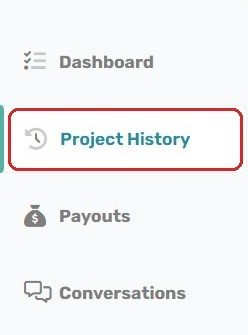
Step 2: Click Download CSV at the top right. Connect saves a file of every study you’ve started.

Step 3: Upload that file to the calculator above.
How to Use the CloudResearch Connect Earnings Calculator
- Upload your CSV. Drop the file in, or tap to choose it.
- Read your results. You’ll see your total earned, your hourly rate, and how much came from study payments, bonuses and screen-outs.
- Check your months. The monthly table shows your best and slowest months, plus your hourly rate each month.
What the Results Mean
- Total earned: approved study payments + bonuses + partial payments from screen-outs. It should match your Connect balance history. Pending studies are counted after they’re approved.
- Per hour: your approved study payments and bonuses divided by the time you spent in those studies.
- Typical study pays: the middle value of all your studies, so a few big studies don’t skew it.
- Approval rate: approved studies out of approved plus rejected. Returns don’t count against you.
Want more studies? Here’s how to get more studies on CloudResearch Connect.
CloudResearch Connect Earnings Calculator FAQ
Is it safe to upload my Connect CSV?
Yes. The file is read in your browser and never uploaded to any server. Nothing is saved.
How much does CloudResearch Connect pay per hour?
I average about $11 an hour based on time spent in studies. Upload your file to see yours.
Does it include bonuses and partial completes?
Yes. Bonuses and partial payments from screen-outs are shown separately and added to your total.
Why doesn’t it match my balance exactly?
Pending studies aren’t counted until they’re approved, and money you’ve already cashed out still counts as earned.
Does it include time checking the dashboard?
No. The CSV only has the time inside each study, so your real hourly rate is a little lower.
This calculator gives estimates for informational purposes only. It isn’t affiliated with CloudResearch.